10 best AI interview agent platforms for hiring QA engineers in 2026
Most AI interview platforms can run a polished behavioral screen — but ask them to evaluate a Selenium script or a CI/CD failure, and the conversation ends. That gap matters: Checkr's 2025 Manager-Employee AI Divide Report found a wide split between manager adoption of AI in hiring and employee confidence in AI's ability to evaluate candidate quality (figures paraphrased from the linked report; verify exact percentages against the source before quoting). For QA hiring, that gap is the whole story.
AI interview agents — software tools that conduct structured candidate interviews, evaluate responses against a rubric, and deliver scored reports — are reshaping how QA engineering teams screen technical talent. But screening a QA engineer requires evaluating automation frameworks, testing strategy thinking, debugging methodology, and pipeline integration knowledge. That is where an AI interview agent platform built for technical depth matters, and where the manager-employee confidence gap from the Checkr data becomes operationally relevant: if your screening signal is shallow, neither side trusts the outcome.
Editorial disclosure: This article is published by HackerEarth. Our platform appears in this list, and we have reviewed it using the same criteria applied to competitors. Where claims about HackerEarth's product capabilities are not yet confirmed against our public product documentation, we have flagged them as pending verification.
An AI interview agent automates candidate screening, conducts structured interviews, evaluates technical competency, and delivers scored reports. For QA roles — covering automated technical interviewing, AI-powered candidate screening for QA, and SDET hiring automation — the platforms that work are those that can assess test automation scripting, API testing proficiency, pipeline familiarity, edge-case identification, and debugging approach.
In this article, we compare the 10 best AI interview agent platforms for hiring QA engineers in 2026, evaluating their features, pros, cons, and pricing to help recruiters and engineering hiring managers choose the right technical screening platform.
The 10 best AI interview agent platforms for hiring QA engineers: side-by-side comparison
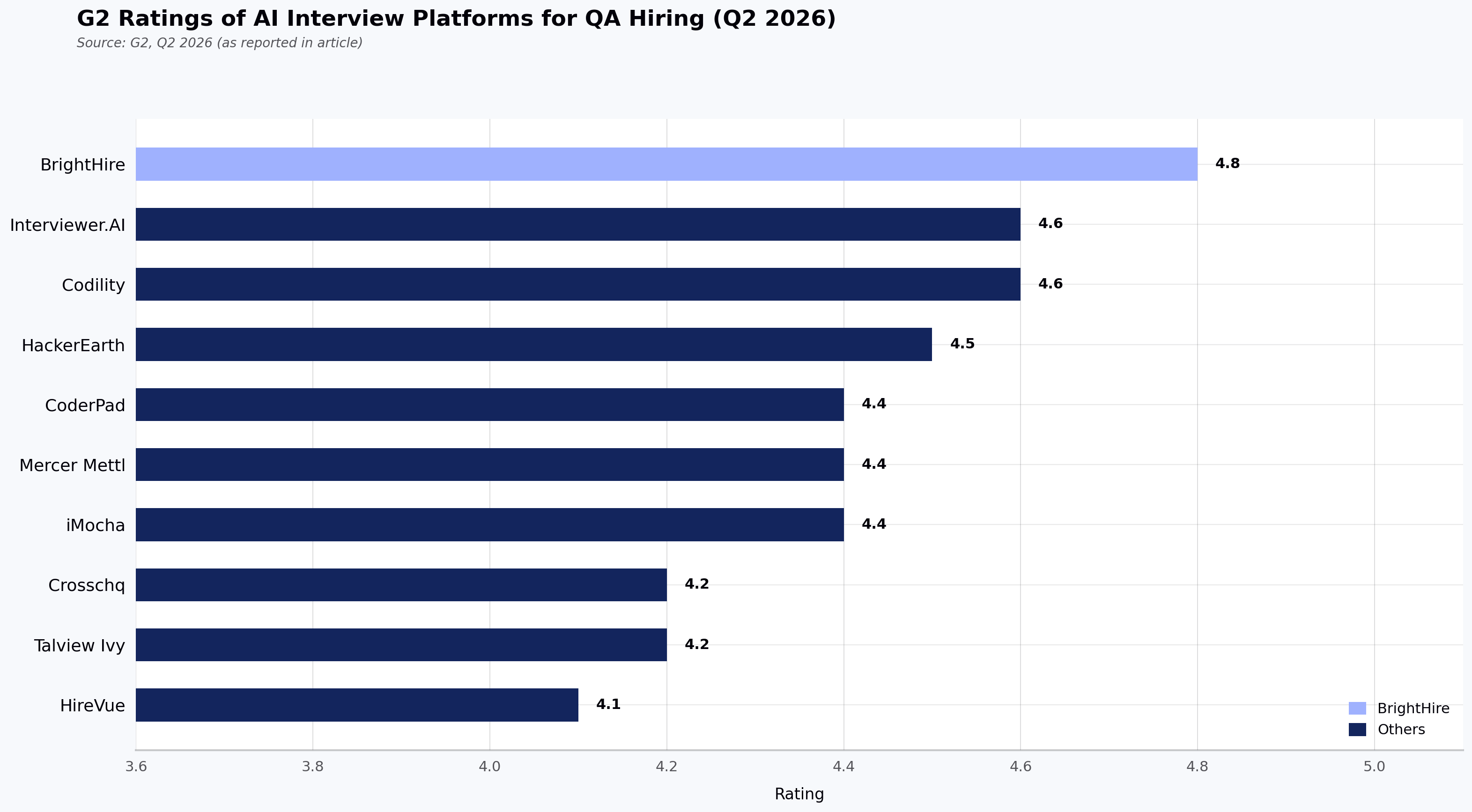
This table gives you a scannable overview of each tool's positioning, strengths, limitations, and verified G2 rating (ratings retrieved Q2 2026; values may change over time). Use it to identify which platforms warrant a deeper look based on your team's specific QA hiring requirements.
| Tool name | Best for | Key features | Pros | Cons | G2 rating (Q2 2026) |
|---|---|---|---|---|---|
| HackerEarth (OnScreen AI Interview Agent) | Full-lifecycle QA technical hiring teams that need adaptive AI interviewing paired with QA coding assessment in a single workflow | OnScreen lifelike AI video avatar interviews, QA-focused assessment library, FaceCode live coding, proctoring under OnScreen | Adapts QA-specific questioning; applies structured rubric-based evaluation that is more consistent across candidates than human-led screens; integrates with common ATS platforms | Lacks free tier or per-interview pricing for low-volume teams; requires onboarding support for deep configuration | 4.5/5 |
| Crosschq | Structured behavioral interviews with authenticity signals | AI-led interviews, structured planning, fraud detection, ATS integration, compliance reporting | Adds a reference intelligence layer absent in most competitors; ships Workday Marketplace–native | Cannot evaluate QA coding or test automation scripts; reportedly requires extended configuration for Greenhouse ATS sync (G2 reviews, 2024) | 4.2/5 |
| Talview Ivy | High-volume behavioral screening with a conversational AI persona | Customizable AI personas, multi-language support, structured evaluation, real-time interaction | Supports conversational interviews in multiple languages for global BPO/banking hiring (specific language count per Talview's published documentation) | Lacks a coding environment; cannot probe automation framework, API testing, or pipeline knowledge for QA roles | 4.2/5 |
| HireVue | Enterprise video interviewing at scale | AI summaries, searchable transcripts, competency validation, Zoom/Teams integration | Integrates natively with Zoom/Teams; standardizes behavioral evaluation for high-volume hiring | Lacks a coding IDE; cannot evaluate test automation or pipeline knowledge; audio/video issues reported in G2 reviews | 4.1/5 |
| CoderPad | Collaborative live coding interviews for developers | Multi-file IDE, AI-integrated projects, integrity toolkit, auto-grading, keystroke playback | Provides real-time multi-file IDE supporting many languages (per current CoderPad documentation); keystroke playback useful for QA scripting review | Lacks pre-built QA test automation libraries; provides minimal post-interview analytics for cross-candidate trends | 4.4/5 |
| Codility | Technical assessment science for engineering teams | Live coding IDE, pair programming, whiteboard, structured workflows, instant feedback | Accessibility-conscious IDE (per current Codility documentation); measures candidate collaboration with its in-product AI assistant | Lacks pre-built automation/API testing assessments; annual-only pricing inflexible for seasonal QA hiring | 4.6/5 |
| BrightHire | Interview intelligence and AI note-taking | AI notes, transcripts, summaries, interview design, clip sharing, ATS sync | Captures every live interview with shareable clips for hiring committees | Does not conduct interviews autonomously; lacks coding assessment; scorecard automation setup reported as unintuitive | 4.8/5 |
| Mercer Mettl | Campus recruitment and large-scale assessment | Online exams, AI proctoring, multiple question formats, multi-language registration | Handles thousands of simultaneous test-takers; offers a wide range of question formats for campus QA drives (specific count per Mercer Mettl's published documentation) | Runs expensive for off-season hiring; limits custom report flexibility for deep QA performance insights | 4.4/5 |
| iMocha | Skills intelligence beyond basic hiring | Conversational AI interviewing module, multi-format questions, role-specific assessments, ATS/HR integration | Offers pre-built assessment categories spanning manual, automation, API, and performance testing (specific module names per iMocha's published documentation) | Non-intuitive test setup; requires extra configuration for advanced reporting on QA insights | 4.4/5 |
| Interviewer.AI | Async video screening with AI scoring | Async interviews, AI avatars, automated scoring, ATS integration | Suits distributed QA pre-screens with an asynchronous format; integrates with ATS/admissions systems | Lacks coding evaluation for QA scripting; requires manual override for nuanced senior-role reviews | 4.6/5 |
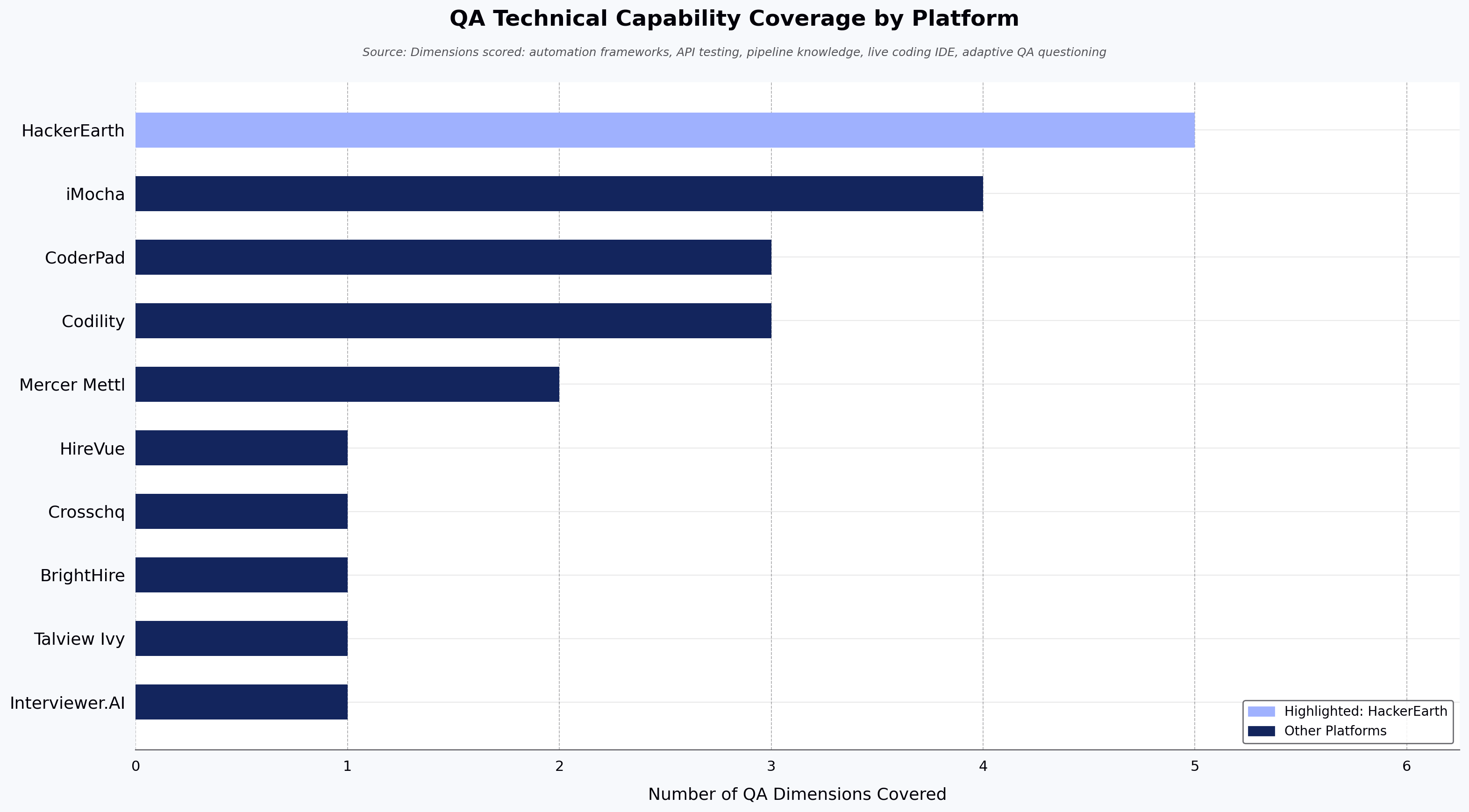
How we evaluated these AI interview agent platforms for hiring QA engineers
Our evaluation drew on hands-on analysis, verified user reviews from G2 and Capterra (2024 to 2026), and hiring criteria specific to QA engineering roles. The eight criteria below shaped our review; each is illustrated in the individual platform write-ups rather than restated separately, so the criteria here are kept brief. The 4.0-rating and 50-review thresholds reflect our editorial cutoff for this comparison rather than an independently audited industry standard.
- QA-specific assessment depth: whether the platform can evaluate common automation frameworks, API testing tools, pipeline knowledge, and test strategy design.
- AI interview adaptiveness: whether follow-up questions adapt to candidate responses and probe for depth. See our guide on how to create a structured interview process.
- Technical interview capability: whether the platform supports live coding, pair programming, code playback, and real-time evaluation for QA scripting tasks, or only behavioral video.
- Proctoring and assessment integrity: depth of anti-cheating measures, including tab-switching detection, webcam monitoring, plagiarism signals, copy-paste prevention, and browser lockdown. The EEOC's May 2023 guidance on AI selection tools recommends employers analyze AI selection tools for adverse impact; confirm the current operative version of this guidance before relying on it for compliance work.
- Enterprise readiness and ATS integration: native integration with common ATS platforms, SSO, API access, and enterprise security certifications. Integration friction is commonly reported in G2 and Capterra user reviews as a hidden cost that can delay ROI. For teams exploring automation in talent acquisition, a platform that creates a new data silo defeats the purpose of adopting AI.
- Candidate experience quality: interface clarity, mobile accessibility, scheduling flexibility, and employer brand impact. In our editorial assessment, based on reviewed user feedback, async AI video screening can be a net positive for QA candidate experience when paired with a coding evaluation stage, but used in isolation it may under-serve senior SDETs whose strongest signal is technical depth, not on-camera polish.
- Pricing transparency and ROI: public availability of pricing, billing frequency, and recruiter efficiency considerations.
- Verified user reviews: customer reviews from G2, Capterra, and TrustRadius, focusing on platforms with an average rating above 4.0 stars and at least 50 verified reviews from 2024 through 2026.
The 10 best AI interview agent platforms for hiring QA engineers: an in-depth comparison
Let's start with the platform that combines AI interviewing with deep technical assessment capability and take a closer look at each.
1. HackerEarth: AI interview agent for full-lifecycle QA technical hiring
Best for: full-lifecycle QA technical hiring teams that need adaptive AI interviewing paired with QA-specific coding assessment in a single workflow.
HackerEarth's AI interviewing product is OnScreen, which conducts technical and behavioral interviews through lifelike AI video avatars and ships alongside FaceCode (live coding) and enterprise-grade proctoring. For QA hiring managers and TA leaders running concurrent open technical roles, the combination is designed to screen QA engineers on real testing competency rather than on-camera presentation alone.

HackerEarth's OnScreen AI Interview Agent delivers adaptive, rubric-based technical interviews.
OnScreen adapts follow-up questions in real time based on each candidate's responses, which means a senior SDET candidate can be probed on framework design while a junior QA candidate is probed on test-case fundamentals — within the same configured interview. The QA-relevant assessment depth (specific frameworks and tools covered) is configured against the HackerEarth assessment library, which spans 1,000+ skills and 40+ programming languages, with customers including Google, Microsoft, Amazon, Elastic, Flipkart, and Brillio. (Specific tools named on this page — automation frameworks, API testing tools, and pipeline knowledge areas — are pending product team confirmation before publication.)
Used together, OnScreen and FaceCode are intended to give engineering teams more consistent first-round screening across candidates than human-led screens alone. Note for editor: a specific named case study with attributed time-to-hire reduction should be added here, or this sentence further softened.
You can learn more about how HackerEarth fits into the broader landscape of top online technical interview platforms, or explore the underlying HackerEarth Assessments used by enterprise QA teams. For a deeper view on how AI is reshaping technical interviews, see our AI Interviewer guide.
Why HackerEarth: product capability summary (not a comprehensive editorial review)
The capabilities below describe HackerEarth's product positioning. Specific tool names (automation frameworks, API testing tools, pipeline components), scorecard dimensions, sandboxed-environment claims, plagiarism detection mechanics, "Smart Browser" feature naming, "private interviewer chat rooms," "code replay," and "AI-generated summaries" within FaceCode are pending verification against the product catalog before publication.
OnScreen adapts follow-up questions based on candidate responses, probing test automation thinking, edge-case identification, and debugging methodology at different depths for different candidate seniorities. Every interview generates a structured scorecard with dimension-level scoring and written rationale (specific dimensions to be confirmed). Candidates can write and execute code in HackerEarth's assessment environment with code quality analysis (specific dimensions to be confirmed). After AI screening, shortlisted candidates can move into FaceCode live coding interviews with QA leads.
For proctoring, HackerEarth's enterprise-grade proctoring under OnScreen uses AI-based webcam monitoring. The AI here uses computer vision trained to flag visual anomalies such as multiple faces in frame or repeated off-screen glances; it surfaces signals of possible integrity issues, not confirmed misconduct, and is intended as input to human review rather than as an autonomous decision.
Who HackerEarth is best for
If you are a technical recruiter, QA hiring manager, or engineering leader running a high volume of concurrent open QA and developer reqs, HackerEarth is built for your pipeline. It is particularly relevant if you are hiring QA automation engineers, SDETs, or QA leads where testing framework expertise must be calibrated before the live interview stage.
Campus recruitment teams screening candidates for QA aptitude across multiple universities can use the same assessment infrastructure for scale. Teams that need structured, rubric-applied evaluation for downstream review will find OnScreen's scorecards and reporting useful.
HackerEarth's pros
- Automates first-level QA screening with structured, rubric-based evaluation
- Combines AI interviewing (OnScreen) with live coding (FaceCode) in one workflow
- Provides enterprise-grade proctoring for compliance reviews
HackerEarth's cons
- Lacks a free tier or per-interview pricing for low-volume use
- Requires onboarding support for first-time administrators given configuration depth
- Centers on adaptive AI interviewing rather than pair programming; teams that need pair programming as the primary signal may prefer CoderPad or Codility
HackerEarth's pricing
Confirmed public pricing: HackerEarth's Skill Assessments Growth tier is listed at $99/month for 10 assessments on the HackerEarth pricing page (retrieved Q2 2026; confirm against the live pricing page before publication).
Pricing not publicly disclosed: Pricing for OnScreen (AI Interview Agent) and FaceCode is not publicly disclosed as of Q2 2026; contact HackerEarth sales for a quote based on interview volume and integration scope. Annual pricing equivalents, Enterprise tier add-ons, and specific support tier features should be confirmed directly with HackerEarth sales.
📌 Related read: How to create a structured interview process: a step-by-step guide for hiring managers
2. Crosschq: AI interview agent for behavioral QA screening with reference intelligence
Best for: TA teams that prioritize behavioral screening and reference intelligence for non-technical or hybrid roles, where coding evaluation is not required.
Crosschq is an AI interview agent platform rooted in reference intelligence and structured behavioral interviewing. The platform conducts AI-led interviews with structured planning, fraud detection through behavioral authenticity signals, compliance reporting, and reference intelligence integration. Its heritage in reference checking gives it credibility in the "quality of hire" conversation, and its Workday Marketplace presence means organizations already running Workday can discover and evaluate it within their existing ecosystem.

Crosschq positions its AI interview agent around structured behavioral interviews and reference intelligence.
However, Crosschq focuses entirely on behavioral interviews and reference verification. It does not evaluate QA automation scripting, testing framework knowledge, API testing methodology, or any form of coding ability.
Key features of Crosschq
- Compliance and reporting: Supports audit trails and regulatory requirements for organizations with strict hiring governance mandates.
- ATS integration with Workday focus: Integrates with Workday Marketplace and other ATS platforms so interview data can flow into existing recruitment workflows.
- Structured interview planning tools: Allows hiring managers to build interview plans with predetermined questions, scoring rubrics, and evaluation criteria before the first candidate is screened.
Who Crosschq is best for
If you are a TA leader or HR director at a mid-to-large enterprise focused on behavioral screening and reference verification for non-technical or hybrid roles, Crosschq fits your pipeline.
Crosschq's pros
- Applies a structured behavioral framework so every candidate is assessed against the same criteria
- Adds reference intelligence as a data layer that most AI interview platforms do not provide
- Integrates natively with Workday to reduce configuration friction in that ecosystem
Crosschq's cons
- According to G2 reviewers in 2024, ATS sync with Greenhouse can require extended configuration and multiple support calls, with data mapping that is not plug-and-play
- G2 reviewers have noted that AI scoring transparency for technical roles can make it difficult to explain why one candidate scored higher than another (G2, 2024)
Crosschq's pricing
Pricing is not publicly disclosed as of Q2 2026; contact Crosschq's sales team for a quote. Pricing conversations typically cover interview volume, ATS integration requirements, and reference intelligence module access.
3. Talview Ivy: AI interview agent for high-volume multilingual screening of QA-adjacent roles
Best for: high-volume behavioral screening in banking, IT services, and BPO where multilingual conversational interviews are the primary requirement.
Talview Ivy is an AI interview agent that conducts real-time conversational interviews with customizable personas across multiple languages (specific language count per Talview's published documentation). It is designed for high-volume behavioral screening, particularly in banking, IT services, and business process outsourcing where organizations need to screen thousands of candidates in multiple languages simultaneously.
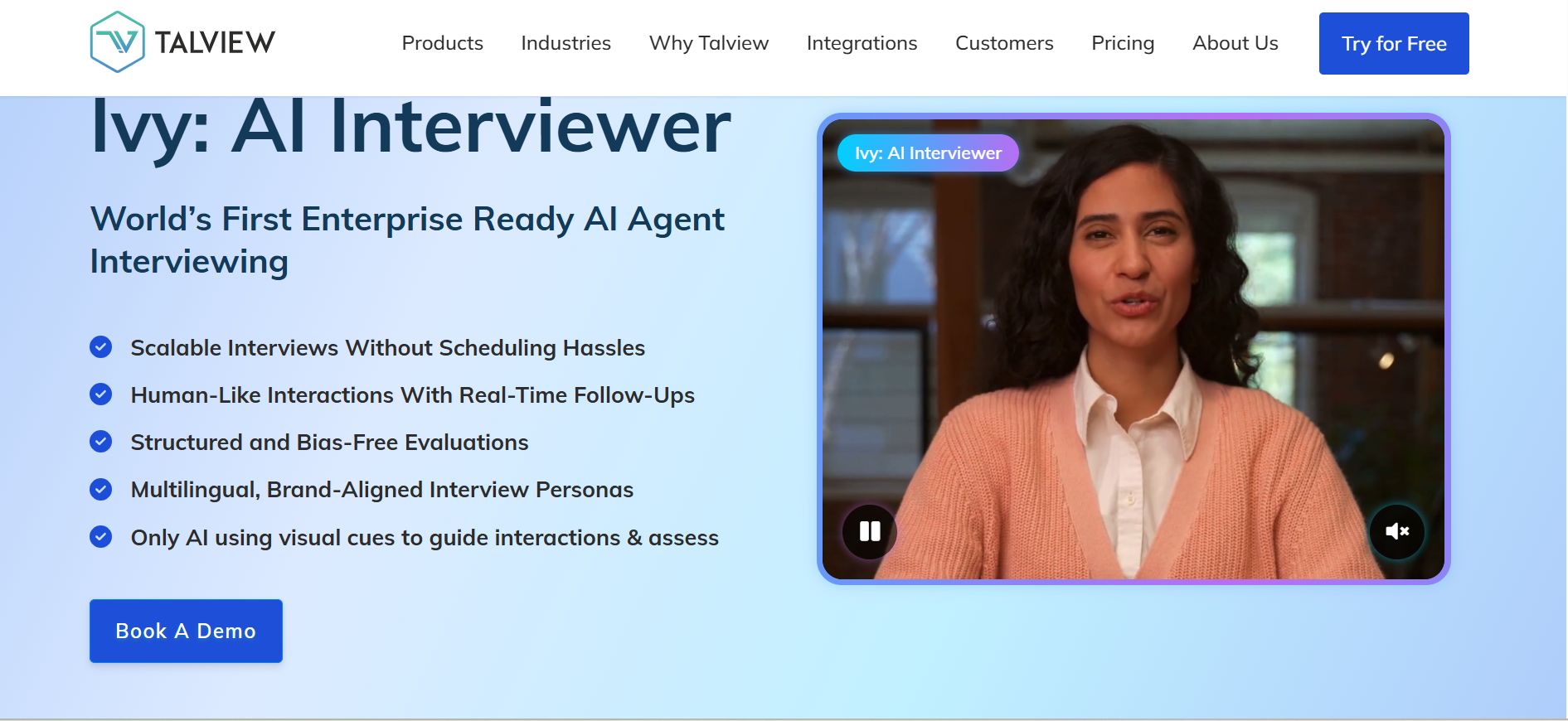
Talview positions Ivy as a conversational AI interview agent with customizable personas.
For QA hiring specifically, Talview Ivy's limitations are significant. The platform cannot probe QA technical depth. It does not evaluate automation scripting, test architecture, API testing methodology, pipeline integration knowledge, or any form of coding competency.
Key features of Talview Ivy
- Real-time conversational interaction: Engages candidates in dynamic, back-and-forth conversation rather than static one-way video recording.
- Structured evaluation with scoring rubrics: Produces a scored evaluation against predefined behavioral criteria for consistent comparison across candidates.
- Fraud detection signals: Flags potential interview fraud or coached responses during the screening process.
Who Talview Ivy is best for
Talview Ivy fits your pipeline if you are in banking, insurance, IT services, or BPO and hiring customer-facing or operations roles across multiple countries and languages.
Talview Ivy's pros
- Supports multi-language behavioral screening for global hiring programs
- Offers a conversational interface designed to create a more engaging candidate experience
- Includes structured rubrics that enable consistent evaluation across high candidate volumes
Talview Ivy's cons
- Lacks any coding environment, so it cannot evaluate automation frameworks, API testing, or pipeline knowledge
- Limits suitability for senior SDET or QA lead hiring where technical depth is the primary signal
Talview Ivy's pricing
Pricing is not publicly disclosed as of Q2 2026; contact Talview's sales team for a quote based on candidate volume, languages required, and integration scope.
4. HireVue: AI interview agent for enterprise video interviewing at scale
Best for: enterprise TA teams running large-volume behavioral video interviews with native Zoom and Teams integration.
HireVue is an enterprise video interviewing platform that uses AI to generate interview summaries, searchable transcripts, and competency validation against structured rubrics. It is widely adopted in Fortune 500 hiring programs for high-volume behavioral screening.
For QA hiring, HireVue does not provide a coding IDE and cannot evaluate automation scripts or pipeline knowledge. It is best deployed as a behavioral screening layer ahead of a separate technical assessment stage.
Key features of HireVue
- AI interview summaries: Generates summaries and searchable transcripts from recorded interviews.
- Competency validation: Maps candidate responses to defined competencies for consistent scoring.
- Zoom and Teams integration: Plugs into the video tools enterprise hiring teams already use.
Who HireVue is best for
Enterprise TA