Home
/
Blog
/
Tech Assessment
/
Mettl vs HackerEarth: Which Rules Coding Interviews?

Mettl vs HackerEarth: Which Rules Coding Interviews?

Author
Vineet Khandelwal
Calendar Icon
March 11, 2026
Timer Icon
3 min read
Share

Explore this post with:

  • Mettl and HackerEarth both support structured technical hiring, but they solve different problems within the recruitment lifecycle.
  • While Mettl focuses on broad, enterprise-grade assessments across technical and psychometric skills, HackerEarth specializes in real-time coding interviews, collaborative evaluation, and developer-first workflows.
  • With 40,000+ coding questions, AI-powered interview summaries, Smart Browser proctoring, and seamless ATS integrations, HackerEarth helps teams identify top engineering talent faster and with greater confidence.
  • If your priority is scalable, data-driven technical hiring with a smooth candidate experience, HackerEarth delivers a more focused and future-ready solution.
  • Ultimately, the right platform depends on whether your hiring challenge is deep enterprise assessment control or speed and precision in technical interviews.

When a hiring manager sets out to evaluate software engineers, most teams turn to online technical assessment platforms to run fair and scalable interviews. The need for structured skill evaluation has pushed companies to move beyond manual interviews and whiteboard sessions.

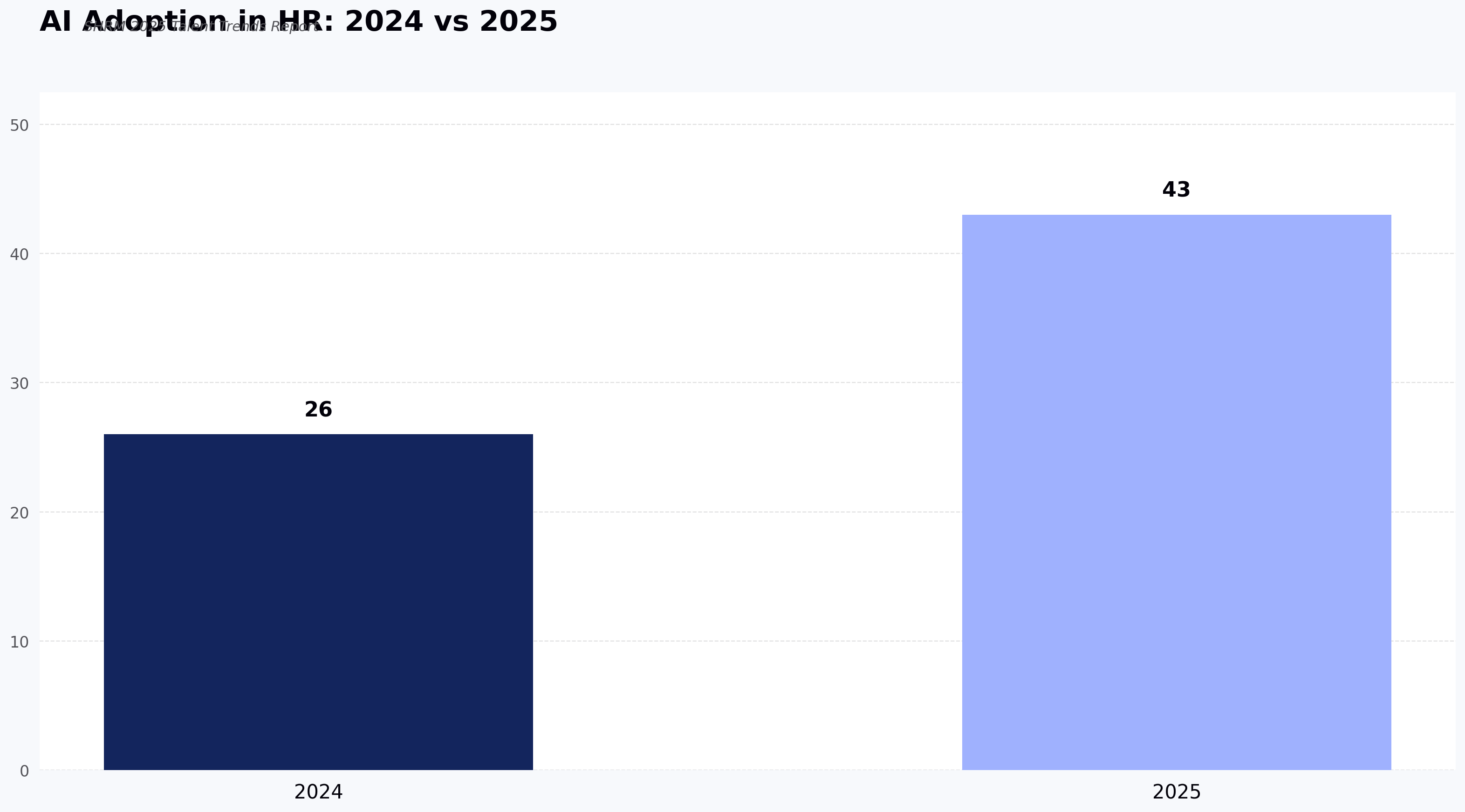
And the shift is accelerating. The percentage of companies using AI in hiring grew from 26% in 2024 to 43% in 2025, according to SHRM. This shows that teams are no longer satisfied with gut instinct or basic coding tests. 

Recruiters want smarter systems that help them identify strong candidates earlier and with more confidence. Additionally, they look for reliable scoring, data-driven insights, and tools that capture top talent early while helping predict on-the-job performance with confidence.

This article offers a comprehensive comparison of two widely used hiring assessment platforms in tech: Mettl and HackerEarth. We’ll explore core features, real-time collaboration, integration ecosystems, analytics, and pricing signals, so you can choose the right tool for your team.

What are Online Assessment Tools?

Online assessment tools are software used by organizations to evaluate skills, knowledge, and abilities through structured digital tests. These tools replace manual methods with scalable, objective evaluations and help hiring teams identify the right candidates efficiently.

Such tools support roles ranging from entry-level to senior developers and help teams screen, interview, and assess talent with minimal bias.

What is Mettl?

Mettl is a talent assessment platform designed to support technical evaluations and broader skill testing for hiring and development. It emphasizes secure online testing and scientific assessment methodologies.

The platform is ideal for companies that need deep, customizable pre-employment tests that measure coding skills, cognitive ability, personality, and job-related competencies. Its coding assessment tools are used across industries to screen developers, quality assurance engineers, data scientists, and engineers working with modern stacks. Mettl also offers 400+ pre-built customized tests in multiple languages, ranging across front-end, back-end, database, DevOps, and data science roles. Recruiters can choose from multiple question formats, including multiple choice, simulation-based coding tests, and case studies that mirror real job scenarios.

One of its best features is its AI-powered remote proctoring system. This system records a candidate’s screen, browser interactions, and video stream to protect assessment integrity. Its secure browser environment tries to prevent cheating and unauthorized navigation during high-stakes evaluations.

Mettl suits both small technical teams and large enterprises that want centralized evaluations across multiple roles and regions. Its analytics give hiring managers insights into performance trends, skill gaps, and role-specific benchmarks. Integration with applicant tracking systems like Workday and Greenhouse also strengthens its role in end-to-end recruitment workflows.

What is HackerEarth?

HackerEarth is an all-in-one coding assessment platform that allows hiring teams to assess candidates’ coding abilities, problem-solving skills, and communication in real time. 

Its Interview FaceCode tool is an online coding interview platform that includes a collaborative code editor, HD video chat, interactive diagram boards for system design, and a built-in library of more than 40,000 questions.  It supports panel interviews with up to five interviewers in a single session, making it easy to assess technical depth and collaboration skills together.

The platform also features an AI-powered Interview Agent that runs structured interviews based on predefined rubrics, adapts to candidate responses, and generates unbiased scores. FaceCode records full interview sessions and transcripts for later review, and it can mask personally identifiable information to support fair evaluations.

FaceCode integrates with leading ATS platforms, including Greenhouse, Lever, Workday, and SAP. It is GDPR-compliant, ISO 27001-certified, and offers 99.99% uptime, making it reliable for both growing teams and large enterprises.

Beyond assessments, HackerEarth connects companies to a global developer community of more than 10 million developers through hackathons and hiring challenges. This gives teams a more interactive way to discover and evaluate talent. Smart Browser Proctoring helps maintain interview integrity by monitoring activity, blocking unauthorized tools such as ChatGPT, and tracking audio, browser tabs, and IP location during assessments.

Feature Comparison: HackerEarth vs Mettl

Before we dive deeper into the features of both tools, let's take a side-by-side look at how HackerEarth and Mettl compare.

Feature Mettl HackerEarth
Assessment Breadth Offers comprehensive pre-employment assessments covering personality, behavioral, cognitive, domain knowledge, coding, and communication skills Focused on developer-centric assessments with 40,000+ coding questions, project-based problems, soft skills, and emerging AI capabilities
Coding Assessment Tools Provides role-based coding simulators, project-based tests, hands-on IDEs, code playback, and automated scoring Offers Coding Assessment Test with 40,000+ questions, real-time code editor, project-based assessments, automated leaderboards, and partial scoring
Live Coding & Collaboration Supports pair programming, interactive whiteboards, role-specific simulators, and secure AI-assisted proctoring FaceCode allows real-time collaborative coding interviews, up to five interviewers, HD video, interactive diagram boards, and AI-generated interview summaries
Evaluation & Scoring Auto-grades objective questions, allows manual scoring of subjective answers, supports custom scoring rules, and detailed analytics Auto-evaluates coding tests, supports partial scoring, leaderboards, and performance dashboards with time, accuracy, and trend metrics
Proctoring & Security Multi-layered AI + human proctoring, three-point authentication, Secure Browser, dual camera, audio monitoring, record & review, ISO-certified AI-driven proctoring with Smart Browser, video snapshots, eyeball tracking, audio monitoring, plagiarism checks, dynamic question shuffling, surprise questions, e-KYC ID verification
Reporting & Analytics Clear, concise reports, interactive graphs, cross-device access, 26+ languages, global-ready dashboards In-depth analytics, Codeplayer records keystrokes, question health scores, candidate funnel insights, completion rates, and score distributions
Integrations & Hiring Workflows Pre-built ATS integrations (Greenhouse, Freshteam, SmartRecruiters, iCIMS, Lever, Workable, Zoho, Keka, others), API & SSO support, webhook updates Pre-built ATS integrations (Greenhouse, LinkedIn Talent Hub, Lever, iCIMS, Workable, JazzHR, Zoho, Eightfold), Recruit API, webhook support, SSO/SAML
Pricing Model Custom quotes based on volume, test type, and enterprise requirements; bundled support/services; high flexibility Transparent tiered pricing for skill assessments, AI interviews, talent engagement, and L&D; options for small teams or enterprise; monthly & yearly billing
Candidate Experience Supports realistic IDEs, hands-on tests, secure proctoring, and project-based assessments Real-time coding interviews, collaborative IDE, Smart Browser, dynamic question sets, plagiarism checks, and surprise questions
Best Use Case Enterprise assessments, large-scale screening, multi-dimensional evaluation (technical, behavioral & cognitive) Developer-focused hiring, live coding interviews, collaborative technical evaluation, scalable coding tests, and AI-driven interview insights

Deep Dive: Assessment & Interview Capabilities

Now that we’ve compared the platforms at a high level, let’s take a closer look at their assessment and interview capabilities to see how they perform in real-world hiring scenarios.

Assessment breadth & depth

To begin with, Mettl offers a comprehensive pre-employment assessment suite that measures both core traits and acquired skills. Some of its core traits include personality, behavioral tendencies, and cognitive abilities, while acquired skills cover domain knowledge, coding, and communication. 

The platform provides customizable assessments, AI-assisted proctoring, and integrations with major ATS platforms. You can evaluate candidates across hundreds of technical and psychometric competencies, including real-world coding simulators and project-based assessments. Mettl emphasizes data-driven insights, predictive on-job behavior evaluation, and security, making it suitable for both large-scale and high-stakes hiring.

As a Mettl alternative, HackerEarth allows teams to assess developers’ technical and soft skills through an extensive library of 40,000+ questions covering 1,000+ skills, including emerging AI capabilities. The platform supports project-based questions, automated leaderboards, and a real-time code editor that works with 40+ programming languages and Jupyter Notebooks. 

The platform provides robust proctoring with SmartBrowser technology, detailed performance reports, and data-driven insights to optimize the hiring funnel. Role-specific assessments, including DSA, psychometric tests, and GenAI tasks, enable recruiters to evaluate both technical problem-solving and critical soft skills efficiently.

🏆Winner: HackerEarth

HackerEarth takes the edge here for developer-focused assessment depth, hands-on coding simulations, and real-time evaluation tools, making it ideal for tech hiring. Mettl is strong in holistic pre-employment testing but doesn’t match HackerEarth’s technical assessment precision.

Live coding & collaboration

When it comes to live coding and collaboration, Mettl provides a robust coding assessment platform with role-based simulators for front-end, back-end, and full-stack development. Candidates can work in realistic IDEs, attempt hands-on coding tests, and even participate in project-based assignments. 

The platform supports seamless pair programming using integrated coding simulators, interactive whiteboards, and a notepad for brainstorming solutions. Auto-graded evaluations, code playback features, and real-time analytics allow hiring teams to quickly review candidate performance and make informed decisions. Mettl also enables secure, AI-assisted proctoring and integration with major ATSs for smooth end-to-end assessment.

Similarly, HackerEarth offers two complementary tools for coding evaluation. The Coding Assessment Test lets recruiters create automated, role-specific coding tests with 40,000+ questions, project-based problems, automated leaderboards, and SmartBrowser proctoring for secure assessments. 

Meanwhile, FaceCode enables real-time, collaborative coding interviews with up to five interviewers, HD video, interactive diagram boards, and support for 40+ programming languages. FaceCode automatically generates AI-powered interview summaries, capturing technical performance, communication, and collaboration insights. Recordings and PII masking helps support fairer, less biased evaluations, and both tools together cover end-to-end coding assessment needs.

🏆Winner: HackerEarth

HackerEarth takes the lead for real-time collaboration and live coding interviews, thanks to FaceCode’s interactive IDE, panel interview support, and AI-driven insights. Mettl does offer simulated coding tests and scalable assessments but lacks the same live collaboration and panel interview sophistication that FaceCode delivers.

Evaluation & scoring

Good scoring can make or break your hiring process. Mettl automatically grades objective questions like multiple-choice items and coding problems, and it also lets evaluators manually score subjective or long-answer responses whenever needed. This combination of automated and human scoring gives hiring teams control over how different question types influence the final result. 

Administrators can design tailored test blueprints, define scoring rules, and create custom evaluation schemes to match the priorities of each role. Additionally, detailed analytics help recruiters benchmark performance across candidates and competencies, ensuring data-driven hiring decisions.

Similarly, HackerEarth focuses on robust automated scoring and actionable analytics. It auto-evaluates coding assessments against predefined test cases and even supports partial scoring, awarding points for solving individual components of a problem. 

The platform generates automated leaderboards and rich analytics on candidate performance, tracking metrics like accuracy, time taken, and problem-solving trends. Its assessment dashboard lets hiring teams compare candidates, spot performance patterns, and refine future tests based on completion rates, score distribution, and other insights.

🏆Winner: Both

Both platforms deliver strong scoring capabilities. HackerEarth edges ahead in automation and partial scoring, while Mettl excels when teams need manual evaluation of subjective responses. The best choice depends on your assessment format.

Proctoring & security

Both Mettl and HackerEarth offer strong solutions, but they approach it slightly differently.

For example, Mettl ensures integrity with a multi-layered proctoring system that combines AI and human oversight. 

  • Before the exam, candidates go through three-point authentication, including email verification, mobile OTP confirmation, and official ID checks. 
  • During the exam, the Secure Browser locks candidates to the test screen and restricts access to unauthorized applications. 
  • AI-powered monitoring flags suspicious behavior, while live human proctors can verify identities in real time. 

Mettl also provides dual-camera monitoring, audio proctoring, and flexible record & review capabilities, allowing administrators to audit exams after they finish. With over 32 million proctored test takers, 2,000+ proctors deployed in a single day, and ISO certifications for data security, Mettl scales proctoring for both small and massive assessments. 

On the other hand, HackerEarth delivers AI-driven proctoring designed for secure, cheat-proof assessments. Their Smart Browser verifies that test scores reflect only a candidate’s ability by blocking unauthorized actions. The platform monitors candidates using video surveillance with AI-powered snapshots and eyeball-tracking, audio monitoring for whispers or external assistance, and dynamic question pooling and shuffling to prevent collaboration. 

Post-test, HackerEarth challenges candidates with surprise follow-up questions to verify understanding and originality. A plagiarism engine scans submissions across the web and past candidate responses, and identity verification leverages government-grade e-KYC systems like DigiLocker. Administrators can further customize proctoring rules, from IP restrictions to copy-paste lockdowns, for airtight security without compromising candidate experience.

🏆Winner: Mettl

Mettl takes this round for its layered combination of AI and human proctoring, three-point authentication, dual-camera monitoring, and proven scale with over 32 million proctored sessions. HackerEarth's AI-driven Smart Browser and plagiarism detection are strong, but Mettl's depth of oversight gives it the edge in high-stakes, compliance-sensitive assessments."

Reporting & analytics

Making sense of candidate data shouldn’t feel like decoding hieroglyphs. With Mettl and HackerEarth, you’ll get actionable insights that help you hire smarter and faster.

Mettl delivers insightful, easy-to-read reports that highlight each candidate’s strengths and weaknesses. Recruiters can navigate quickly through summaries, interactive graphs, and charts, and even customize the report format to match their priorities. Reports support cross-device access and more than 26 international languages across 80+ countries, making them usable globally. 

However, HackerEarth provides in-depth, data-driven analytics that focus on top performers and test effectiveness. The platform uses Codeplayer to record every keystroke and replay coding sessions, giving recruiters insight into logical approach, problem-solving, and programming skills. 

Question-based analytics and a health score for each question help teams pick questions that match desired difficulty and learning outcomes. HackerEarth tracks assessment completion, score distribution, and candidate funnel metrics, helping teams refine future tests. 

🏆Winner: Mettl

While HackerEarth provides robust, in-depth analytics, Mettl wins this round for its combination of clarity, actionable insights, cross-device access, and international readiness, which makes it easier for hiring teams to make fast, confident decisions at scale.

Integrations & Hiring Workflows

In modern hiring, your technical assessment platform needs to fit into your broader ATS, HRIS, SSO, and API workflows, so recruiters and hiring ops can move smoothly through every hiring stage. 

Here’s how Mettl and HackerEarth perform with respect to integrations and hiring workflows:

Mettl

Mercer | Mettl integrates tightly with a wide range of ATS and hiring tools, helping teams manage assessments and candidate data without breaking their existing workflows. It offers pre‑built integrations with major ATS platforms, such as: 

  • Greenhouse
  • Freshteam
  • SmartRecruiters
  • iCIMS
  • Ashby
  • Lever
  • Workable
  • Zoho Recruit
  • Keka
  • Peoplise
  • Superset, and more

This enables teams to trigger assessments from within their ATS, sync candidate test status, and pull back detailed results directly into the recruiting system dashboard.

Mettl’s support for REST APIs lets you map jobs, create assessments, register candidates, and push scores and report URLs back into your HR systems programmatically. It also supports SSO (including SAML‑based sign‑on) and webhook‑style callbacks to deliver real‑time updates when tests start, finish, or get graded. This helps orchestrate workflows like interview scheduling or automated stage progression.

HackerEarth

HackerEarth also fits neatly into existing hiring stacks and helps recruiters automate assessment tasks across systems. It supports direct integrations with popular ATS platforms, including: 

  • Greenhouse
  • LinkedIn Talent Hub
  • Lever
  • iCIMS
  • Workable
  • JazzHR
  • SmartRecruiters
  • Zoho Recruit
  • Recruiterbox
  • Eightfold 

These integrations let teams create tests, invite candidates, and view detailed candidate reports without switching between tools.

On top of pre‑built ATS connectors, HackerEarth provides a Recruit API that developers can use to manage tests, invites, and results from their own systems. This makes it possible to automate candidate invites, collect reports, and embed assessment tasks into broader HRIS‑driven workflows. Detailed API support and webhook‑style event flows help plug assessments and live interviews (including FaceCode) into your hiring operations.

In terms of SSO and security, both platforms support modern authentication standards like SAML and API key‑based access, which helps your teams manage user access consistently across tools and protect candidate data throughout the hiring lifecycle.

🏆Winner: HackerEarth

HackerEarth combines a broader set of ready‑to‑use ATS integrations with flexible APIs and automated invite/report workflows. This makes it easier to connect assessments and live interviews with your hiring pipeline. 

Pricing Signals & Packaging

Pricing transparency influences buying decisions, and the right assessment platform delivers maximum value and clear results for your investment.

Mettl

Mettl does not publish standard pricing online, and instead offers customized plans based on your organization’s size, assessment volume, and feature needs. You’ll have to speak with their sales team or request a demo to get a quote.

Here's what you can generally expect from Mettl's pricing approach:

  • Custom quotes tailored to your business context
  • Plans shaped by assessment volume, test types, and usage rather than rigid tiers
  • Support and customization bundled into pricing, such as bespoke tests, branding, and integration help
  • High‑security and compliance credentials (ISO 9001, ISO 27001, SOC2 Type 2) often reflected in pricing for enterprise customers

Because Mettl doesn’t list prices publicly, smaller teams or startups may find it harder to estimate a budget without engaging sales upfront. However, enterprises with complex assessment needs, especially those requiring custom workflows, integration support, or remote proctoring at scale, can benefit from Mettl's tailored plans.

HackerEarth

HackerEarth publishes clear-tiered pricing for many of its core offerings, making it easier to budget and compare. Their pricing structure breaks into distinct product areas with monthly and yearly billing options (yearly offers roughly 2 months free):

1. Skill Assessments

  • Growth ($99/month): Starter tier with basic assessment credits, coding questions, and plagiarism detection.
  • Scale ($399/month): Larger question library (20K+), advanced analytics, video response support, calendar and ATS integrations.
  • Enterprise (custom pricing): Full library access (25K+), API/SSO, professional services, global benchmarking, and premium support.

2. AI Interviewer

  • Growth ($99/month): AI‑driven interviews, real‑time code evaluation, screening, templates, and analytics.
  • Enterprise (custom pricing): Additional enterprise‑grade SSO, custom roles & permissions, and professional services.

3. Talent Engagement & Hackathons

  • Custom Pricing: Includes hackathons, community challenges, and brand engagement

4. Learning & Development

  • Free developer practice content
  • Business tier (~$15/month per user) for developer upskilling, competency mapping, and insights

HackerEarth’s pricing is among the most transparent in the space, and its tiered plans help teams pick the most relevant level based on hiring volume and sophistication. Smaller teams can start with reasonably priced, self‑service plans, while larger orgs can opt for enterprise capabilities.

To make it easier for you, here’s a side-by-side HackerEarth vs Mettl comparison in terms of pricing:

Aspect Mettl HackerEarth
Price Transparency Low: Custom quotes only High: Published tiers and demos
Best Fit for Small Teams Harder to estimate without sales Clear starter plans available
Enterprise Flexibility Strong, highly customizable Strong with a custom enterprise tier
Bundled Support/Services Often included Available, sometimes premium
Modular Product Pricing Assessment-centric Skill tests, AI interviews, engagement, and learning

Decision Framework: Which Platform Should You Choose?

Finding the right online technical assessment platform can be challenging. You want a solution that fits your hiring needs, supports your workflow, and gives candidates a smooth experience. 

However, each platform has strengths, depending on what your team is looking for. For example, if your main goal is conducting coding interviews, HackerEarth works exceptionally well. Its real-time coding environment allows multiple interviewers to collaborate, supports over 40 programming languages, and automatically generates detailed reports after each session. Recruiters can evaluate candidates quickly, compare results, and make confident decisions without manual intervention.

If you need deep analytics and structured scoring, Mettl is the absolute winner. It allows administrators to create custom scoring rubrics, combine auto-graded and manual evaluations, and produce interactive reports that highlight candidate performance trends. Mettl works well for large enterprises that require detailed insights across multiple roles and skill levels. Its reporting helps you spot skill gaps, benchmark candidates, and make data-driven decisions with confidence.

Integrations and hiring workflows are another key consideration. Both platforms support ATS and HRIS integrations and single sign-on, but HackerEarth provides a slightly more seamless experience for connecting assessments to existing systems. You can schedule interviews, share results, and track candidates across the funnel with minimal manual effort. Mettl offers flexibility and customization for enterprises that want complete control over the assessment and reporting process.

HackerEarth gives candidates a smooth coding experience with instant feedback and a clean interface. Mettl provides a highly secure environment with AI-assisted proctoring, dual-camera monitoring, and browser lockdowns. Candidates feel that the assessment is fair and reliable, which is particularly important for high-stakes tests.

Here’s a simple way to think about your decision:

  • Ask yourself if coding interviews are your top priority. If yes, HackerEarth is a strong choice. 
  • Consider whether deep analytics and structured scoring are essential. If yes, Mettl becomes the clear option. 
  • Determine if ATS integration and workflow automation are critical. If yes, HackerEarth provides a more ready-to-use solution. If no, Mettl still offers flexibility for customization.
  • Think about the candidate experience. If you want a highly secure proctoring setup, Mettl stands out. If you want a fast, interactive coding experience, HackerEarth excels.

The Right Tool Depends on How You Hire

In all your hiring processes, data drives decisions, and a structured tech assessment platform comparison highlights the strengths of each solution.

Many organizations combine both, using HackerEarth as an all-in-one online coding interview tool and Mettl for large-scale, data-driven assessments. Your choice should match your team’s workflow, hiring volume, and the type of insights you want from each assessment.

Choose Mettl if you:

  • Need enterprise-grade depth and compliance control
  • Want structured scoring and detailed analytics across multiple roles and skills
  • Conduct high-volume assessments where standardized evaluations matter most

Choose HackerEarth if you:

  • Focus on real-time coding interviews with a collaborative coding environment
  • Want fast, developer-friendly workflows that scale easily
  • Need actionable insights instantly to make better hiring decisions

Elevate your hiring process from start to finish. Get started with HackerEarth today and discover top candidates with confidence.

FAQs

Is Mettl better than HackerEarth for coding assessments?

Both platforms support coding assessments, but they work differently. Mettl offers a broad range of test types that go beyond pure coding, including personality, behavioral, and cognitive evaluations, as well as programming problems. HackerEarth provides a large library of coding questions (40,000+) and tools focused more on developer skill evaluation and interview workflows, which many teams prefer for technical screening.

Which tool offers better live coding experiences?

If live coding interaction matters most, HackerEarth stands out. Its online coding interview tool integrates a real‑time editor, video chat, diagram boards, and collaborative features that let multiple interviewers work with a candidate in one session. This setup makes it easier to evaluate problem‑solving and communication together.

Which has deeper analytics?

Mettl provides detailed analytics across many dimensions, including performance trends and candidate behavior, and reports that cover both technical and non‑technical skills. HackerEarth also gives valuable analytics, especially focused on coding performance and behavior during tests, but teams that need broad analysis across multiple assessment types often find Mettl’s reporting more comprehensive.

What integrations do these platforms support?

Both platforms integrate with applicant tracking systems and HR tools. HackerEarth integrates with many ATS products, allowing teams to launch tests and view results without leaving their systems. 

Which platform is more scalable?

Both platforms handle large hiring volumes. Mettl’s architecture supports massive assessment loads in a single day and a wide range of assessment types, making it suitable for enterprise screening. HackerEarth scales especially well for technical interviews and ongoing developer hiring at medium to large organizations.

Subscribe to The HackerEarth Blog

Get expert tips, hacks, and how-tos from the world of tech recruiting to stay on top of your hiring!

Author
Vineet Khandelwal
Calendar Icon
March 11, 2026
Timer Icon
3 min read
Share

Hire top tech talent with our recruitment platform

Access Free Demo
Related reads

Discover more articles

Gain insights to optimize your developer recruitment process.

Pre-Employment Coding Tests: Recruiter's Guide 2026

Pre-Employment Coding Tests: Recruiter's Guide 2026

The U.S. Department of Labor estimates a bad hire costs at least 30% of the employee's first-year salary. For a $130,000 senior engineer, that is $39,000 before you account for lost productivity, team disruption, and the weeks spent restarting the search. Most of that risk traces back to a broken screening process: resumes that inflate skills, unstructured interviews that measure confidence over competence, and hiring decisions made on instinct.

Pre-employment coding tests solve this directly. A well-designed pre-employment coding test gives every candidate the same objective problem, evaluates the result against consistent criteria, and produces a defensible, data-backed signal before anyone has spent an hour of interview time.

This guide is for recruiters, hiring managers, and engineering leads building or refining a technical hiring process. It covers what coding tests are, how to choose the right format, how to design assessments that actually predict job performance, how to protect integrity, how to evaluate results fairly, and how to avoid the mistakes that turn a good testing program into a candidate drop-off machine. Note: this is a practical implementation guide focused on screening workflow; it does not exhaustively cover EEOC legal review, accessibility accommodations under the ADA, or multi-region data privacy compliance (GDPR, India DPDP, etc.). Consult qualified counsel for those areas.

What is a pre-employment coding test?

A pre-employment coding test is a standardized assessment given to job candidates before the live interview stage to objectively measure programming skills, problem-solving ability, and code quality. Candidates receive coding challenges on an assessment platform, write code in a real or simulated IDE, and results are scored automatically or reviewed by engineers against consistent criteria.

What every format shares is that it creates a concrete, reproducible record of what a candidate can actually do, rather than what they claim on a resume.

Types of coding tests used in hiring

The five main formats each serve different evaluation goals. Algorithmic coding challenges test data structure and problem-solving fluency under timed conditions. Project-based take-home assignments evaluate real-world code quality, architecture thinking, and documentation. Multiple-choice tests screen foundational language knowledge at high volume. Live coding interviews let interviewers observe how a candidate thinks in real time. Pair programming assessments evaluate collaboration alongside technical ability. Each format is covered in full in Step 2.

When pre-employment coding tests are not the right tool

Pre-employment coding tests are powerful for high-volume technical screening, but they are not universally appropriate. For highly specialized research roles (e.g., applied ML researchers, compiler engineers, cryptography specialists), a standardized challenge rarely captures the depth of the work, and a portfolio review plus deep technical conversation is typically a stronger signal. Internal transfers with documented performance histories generally should not be re-screened with the same assessment used for external candidates. Niche language experts or open-source maintainers with verifiable public portfolios may also be better evaluated on the artifacts they have already shipped. Scoping when not to test is part of designing a defensible hiring process.

Why pre-employment coding tests are critical for technical hiring

The problem is not a shortage of applicants: it is a shortage of reliable signal. Engineering roles take an average of 62 days to fill globally, according to Workable's 2024 benchmarking data, and roughly 70% of tech recruiters say they consistently receive unqualified applicants for every technical role they post, according to industry reporting from DevSkiller. Without a structured pre-hire coding challenge, teams discover skills gaps during live interviews, which is the most expensive point in the funnel to find out a candidate cannot do the job.

The research supports this directly. Schmidt and Hunter's 1998 meta-analysis, and the updated analysis by Schmidt, Oh, and Shaffer (2016), found that work sample tests have a validity coefficient of .33 to .54 for predicting on-the-job performance, substantially higher than education (.10) or years of experience (.18). A coding aptitude test is, by design, a work sample test. According to TestGorilla's 2025 State of Skills-Based Hiring report, roughly 85% of employers now use some form of skills-based hiring, up from 73% in 2023. The question is not whether to use coding tests. It is how to use them effectively.

Predictive Validity of Hiring Selection Methods
Source: Schmidt, Oh & Shaffer (2016); Schmidt & Hunter (1998)

Step 1: Define the role requirements and testable skills

The most common reason a pre-employment coding test fails to predict job performance is that it tests the wrong things, and that is entirely preventable if you start with a job analysis rather than a question library.

Work backward from what the engineer will do in their first 90 days. Identify must-have skills, where a gap disqualifies the candidate regardless of everything else, and distinguish them from nice-to-have skills that can be learned on the job. Map skills to test formats based on what each format can actually measure: algorithm design for backend roles, DOM manipulation for frontend engineers, API integration scenarios for full-stack developers. System design belongs in the live interview, not a pre-employment skills testing stage.

A skills matrix structures this before you build anything:

Skill Priority Test Format Difficulty Level
Python data structures Must-have Algorithmic coding challenge Mid
REST API design Must-have Project-based task Mid-senior
SQL query optimization Must-have Coding challenge Mid
Git workflow Nice-to-have MCQ Foundational
System architecture Nice-to-have Live interview Senior

The matrix forces alignment between engineering and recruiting before the test is built. It is also your first line of legal defense: tests traceable to specific job tasks are far easier to defend under EEOC scrutiny than tests assembled from a generic question bank.

Step 2: How to choose the right type of coding assessment

A pre-employment coding test that works well for junior backend hiring will actively mislead you when evaluating a senior full-stack candidate, and this is one of the most common and preventable process mistakes in technical hiring.

Multiple-choice questions (MCQs)

MCQs are useful as a first-pass filter for high-volume junior pipelines, but answering a multiple-choice question about recursion is not the same as writing a recursive function. Use them to screen out candidates who lack basic fluency before they invest time on a coding problem. Never use them as a standalone technical skills evaluation.

Algorithmic coding challenges

Algorithm tests are the most common format for backend and infrastructure roles, and the most misused. The well-documented limitation is that LeetCode-style challenges favor candidates who have practiced competitive programming, and senior engineers with real-world experience frequently underperform relative to their actual capability. Use algorithmic tests as one signal, not the deciding one.

Project-based and take-home assignments

Take-home assignments produce the richest signal of any pre-hire coding challenge format because reviewers can see how a candidate structures a solution, handles edge cases, and documents their thinking. The tradeoff is that candidates with competing offers will not complete an assignment that feels open-ended or excessive. Keep scope tight, share the evaluation criteria upfront, and cap the expected time at two to four hours.

Live coding interviews

Live coding is best reserved for final-round evaluation, where observing thought process and debugging behavior in real time is worth the scheduling cost. Some strong engineers simply perform poorly when watched, so use this as a late-stage filter, not an early screen.

Pair programming assessments

Pair programming works well for collaboration-heavy teams and senior roles where working style matters as much as raw output. Scheduling complexity limits scalability, which makes it practical mainly for final-round or specialized role evaluation.

Assessment type comparison

Assessment Type Scalability Realism Candidate Experience Evaluation Effort Best For
MCQ High Low Low friction Low High-volume, foundational screening
Algorithmic Challenge High Medium Mixed Low (automated) Backend, infrastructure, junior-to-mid roles
Project / Take-Home Low-medium High High friction Medium-high Mid-to-senior, code quality focus
Live Coding Low High Variable High Final-round, process observation
Pair Programming Low Very High Positive High Senior, team-fit evaluation

Step 3: Select a coding assessment platform

Platform selection has downstream consequences for every hire you make, and a weak choice here creates friction at exactly the points where hiring speed matters most.

When evaluating coding assessment platforms, focus on criteria that are independent of any specific vendor: does the question library cover the languages and frameworks you actually hire for, or will your team spend weeks authoring custom content? Does the platform integrate natively with your ATS (Greenhouse, Lever, Workday, iCIMS), or will recruiters re-key candidate data? What signals does the proctoring system surface, and can you interpret them quickly when reviewing flagged sessions? Can you customize scoring rubrics for proprietary questions, or are you locked into the vendor's defaults? Does the reporting let hiring managers compare candidates against a cohort, or only against a static score? Capterra's 2024 candidate research, summarized in their job seeker survey coverage, found that around 58% of candidates used AI tools to complete assessments — making proctoring signal quality a load-bearing criterion, not a checkbox.

Different platforms make different tradeoffs here. Codility is widely cited for clean candidate-facing UX and a strong focus on engineering-team workflows. HackerRank has one of the deepest public question libraries and a large developer community footprint, which helps with content variety. TestGorilla's strength is breadth: multi-skill assessments that extend beyond pure coding into cognitive, personality, and role-fit testing, which suits generalist hiring.

HackerEarth, positioned as a skills intelligence platform, takes a different approach on integrity signal: rather than surfacing raw proctoring logs and asking recruiters to interpret them, the platform consolidates plagiarism, environment, and behavioral signals into a single per-candidate integrity output that recruiters can act on without forensic review — a tradeoff competitor platforms often leave to the reviewer. HackerEarth covers 40+ programming languages, supports 1,000+ skills across role types, and offers role-specific templates for frontend, backend, data science, and DevOps so hiring managers do not start from a blank slate. ATS integrations with Greenhouse, Lever, iCIMS, and Workday route results into the candidate record automatically. It is used by 500+ global enterprises including Google, Microsoft, Elastic, Flipkart, and Brillio.

Step 4: Design a fair, effective, and job-relevant pre-employment coding test

Platform selection is the infrastructure decision. Test design is the content decision, and most well-resourced technical hiring programs still underperform here.

Set the right duration

Forty-five to 90 minutes is the optimal range for a timed online pre-employment coding test. Below 45 minutes, complex challenges cannot be evaluated meaningfully. Beyond 90 minutes, completion rates drop sharply among senior candidates with competing offers. Take-home projects are the exception: two to four hours is acceptable when scope is explicitly defined and candidates know what "done" looks like.

Calibrate difficulty to the role

Testing a senior engineer on problems they solved in year one is the equivalent of asking a seasoned chef to boil water to prove they can cook. Define difficulty bands before building the test: Junior (0-2 years) needs language fundamentals and basic data structures; Mid-level (3-5 years) needs applied problem-solving and API integration; Senior (6+ years) needs system design judgment, code review, and performance optimization.

Mix question types strategically

One to two MCQs combined with one to two coding challenges produces a more accurate signal than either format alone. MCQs identify candidates who lack basic fluency before they invest time on a harder problem; coding challenges surface gaps that MCQ performance does not predict.

Reduce bias in test design

This is the area where most competitor guides stop short, and it is the most consequential one for both fairness and legal compliance. Avoid questions that require knowledge of specific cultural contexts, idioms, or domains that favor particular educational backgrounds. The test should measure coding ability, not cultural familiarity.

The EEOC's May 2023 technical guidance makes explicit that adverse impact and job-relatedness requirements under Title VII apply to algorithmic and AI-assisted selection tools. Any test producing a disproportionate pass or fail rate for a protected group must be demonstrably job-related and consistent with business necessity, or it creates legal liability.

Practical steps: document the link between each question and a specific job task before publishing the test; apply the four-fifths rule (if a protected group's pass rate falls below 80% of the highest-performing group's pass rate, investigate); and do not use LeetCode performance as a proxy for software engineering ability. Research, including work summarized in the ACM's review of technical interview practices, suggests the correlation between competitive-programming performance and real-world engineering effectiveness is weaker than commonly assumed. These tests can also systematically disadvantage candidates from non-traditional backgrounds who are strong practical engineers.

Step 5: Implement anti-cheating and proctoring measures

Skipping proctoring is not a neutral decision heading into 2026: it is a decision to accept that a meaningful portion of your results cannot be trusted. Capterra's 2024 candidate research reported that around 58% of candidates used AI tools to complete assessments, and the Identity Theft Resource Center's 2024 trends report documented that application fraud rose more than 118% between 2023 and 2024.

Effective remote proctoring for online assessments layers multiple signals: plagiarism detection that compares submissions against known published solutions and other candidates in the cohort, browser lockdown to block access to AI tools and search engines, webcam monitoring using computer vision rather than manual review, randomized question pools so candidates cannot share answers, and IP tracking to flag submissions from the same device.

The balance with candidate trust is real. Communicate proctoring measures in the assessment invitation, explain why they exist, and calibrate oversight to the role's sensitivity. Senior engineers view intrusive monitoring as a signal about organizational culture, and the employer brand damage from that reaction is harder to undo than the integrity risk you were trying to prevent.

Step 6: Evaluate results and make data-driven hiring decisions

A test score is not a hiring decision, and teams that treat it as one will make the same mistakes as teams that never ran the test at all.

Automated scoring vs. manual review

Automated scoring removes the variance that comes from different engineers reviewing the same submission with different standards. Rubric-applied evaluation is more consistent across candidates than human-led screens and does not vary by interviewer mood or fatigue, where variable naming style and code structure conventions can unconsciously influence how a reviewer rates competence. For mid-to-senior roles, combine automated scoring for correctness and efficiency with targeted manual review of code architecture and readability.

Build a scoring rubric

Every candidate should be evaluated against the same weighted criteria. A sample rubric:

Criterion Weight What to Evaluate
Correctness 40% Does the code produce the right output across all test cases, including edge cases?
Efficiency 25% Is the time and space complexity appropriate? Are obvious optimizations made?
Code Quality 20% Is the code readable? Are naming conventions consistent? Is the logic well-structured?
Edge Case Handling 15% Does the candidate account for null inputs, boundary conditions, and unexpected states?

Set benchmarks and pass thresholds

An arbitrary cutoff like "everyone above 70% passes" is not a benchmark, it is a guess. Use percentile-based cutoffs calibrated to your actual candidate pool: the top 30% of submissions for a role type is a more defensible threshold than a static score. HackerEarth's reporting supports cohort-level comparisons so pass thresholds can reflect real performance distributions rather than guesses.

Avoid common evaluation pitfalls

Speed is not skill. A candidate who solves a problem in 30 minutes is not necessarily better than one who takes 60; penalize only when completion time indicates the candidate could not arrive at a solution, not because they were slower than average. A valid but unconventional solution is also not a failure: if the code is correct, efficient, and readable, the approach the candidate used tells you something positive about how they think.

Step 7: Communicate clearly with candidates before, during, and after

The developers you most want to hire have options, and a confusing or silent assessment process is enough to lose them to a competitor who treats communication as part of the job.

Provide timely, constructive feedback

Talent Board's CandE Benchmark Research consistently shows that candidates who receive feedback (even a rejection) rate the employer more favorably than those who receive nothing. In a market where roughly 61% of job seekers report being ghosted after an interview, per Greenhouse's 2024 candidate experience research, any communication at all is a differentiator. A note indicating the general area where a candidate did not meet the bar protects the employer brand and keeps the door open for future applications.

Set clear expectations for the interview stage

Tell shortlisted candidates what the live interview will cover before they arrive. The assessment invitation itself should include the expected duration, what to have ready, a description of what skills are being tested, the proctoring measures in use, the submission deadline, and a contact for technical issues.

Step 8: Integrate pre-employment coding tests into your hiring workflow

A pre-employment coding test produces its full value only when it sits in the right place in the funnel, and that place is stage two, after the resume screen and before any engineer's time is committed.

A typical technical hiring funnel with coding tests placed correctly:

  1. Application and resume screen (automated or manual)
  2. Pre-employment coding test (screening stage: automated delivery, automated scoring)
  3. Technical phone screen or live coding interview (shortlisted candidates only)
  4. On-site or final round (behavioral, system design, culture fit)
  5. Offer

ATS integration makes this practical at scale. Platforms that connect natively with Greenhouse, Lever, and Workday trigger assessment invitations automatically, route results back into the candidate record, and apply pass/fail logic without manual recruiter intervention. The long-term refinement loop matters as much as the initial setup: track which questions correlate with strong 90-day performance reviews and retire the ones that do not predict what you need them to predict. For deeper guidance on building this end-to-end, see HackerEarth's resources on skills-based hiring and technical interview design.

Common mistakes that undermine your coding assessments

Most assessment programs fail not because the platform was wrong but because of predictable process errors that go unexamined.

Testing skills that are irrelevant to the actual job. Every question should trace back to the skills matrix from Step 1. A puzzle that has nothing to do with the day-to-day work filters for interview prep performance, not job readiness, and strong candidates who recognize the disconnect opt out.

Making the test too long. Senior developers with multiple offers will not complete a three-hour screen before they have had any meaningful interaction with the company. Completion rates drop sharply past 90 minutes, and over-length tests produce more drop-off, not more signal.

Using a one-size-fits-all assessment for all roles and levels. A test calibrated for a mid-level backend engineer is wrong for a junior frontend hire and wrong again for a senior DevOps lead. Each role requires its own skills matrix and difficulty calibration.

Relying solely on automated scores without context. A candidate who scores 68% on a well-designed test may be significantly more capable than one who scores 75% on a poorly designed one. Scores are inputs to a decision, not the decision itself.

Not validating the test for adverse impact or job-relatedness. Failing to document the link between test content and job requirements, or failing to monitor pass rate disparities across demographic groups, creates Title VII liability under the EEOC's Uniform Guidelines on Employee Selection Procedures. This is the most consistently overlooked area in pre-employment testing programs.

Failing to iterate on test design. A coding test that was well-designed 18 months ago may now have its questions circulating on developer forums. Track the correlation between assessment scores and 90-day performance reviews; the questions that are no longer predicting performance are the ones to retire.

Frequently asked questions about pre-employment coding tests

Is a pre-employment coding test the same as a LeetCode-style interview?

No, and conflating the two is one of the most common reasons hiring programs underperform. A LeetCode-style problem is one narrow input — competitive-algorithm fluency under time pressure. A well-designed pre-employment coding test is broader: it can include work-sample tasks, debugging exercises, API integration scenarios, or framework-specific problems that resemble the actual job. The "test" is the design philosophy, not a specific question format, and the most effective programs deliberately move away from pure algorithm puzzles for non-algorithm-heavy roles.

How long should a pre-employment coding test take?

Forty-five to 90 minutes is the optimal range for a timed coding challenge; take-home projects should be capped at two to four hours with clearly defined scope. Senior candidates in particular will abandon anything that feels like an unreasonable time investment before a first interaction with the company.

Are coding tests a reliable predictor of job performance?

Work sample tests have a validity coefficient of .33 to .54 for predicting on-the-job performance according to Schmidt and Hunter's 1998 meta-analysis (and the 2016 update by Schmidt, Oh, and Shaffer), which is substantially better than education (.10) or years of exper

How to Automate Engineering Candidate Screening

How to automate engineering candidate screening

Automated candidate screening — the use of AI and software to evaluate, score, and filter job applicants against predefined criteria without a human reviewing every application — combines resume parsing, skills assessments, AI-scored coding tests, and structured interview screening into one connected workflow that ranks candidates at scale.

If you are a recruiter or hiring manager running an engineering req, the pressure is familiar: a senior backend developer role posts on Monday, hundreds of applications hit the pipeline within a few weeks, and the two technical leads you depend on to screen are already stretched across sprint commitments. Manual resume review takes time most engineering teams do not have — informal industry estimates put resume scan time anywhere from roughly 30 seconds to several minutes depending on role complexity. That means someone on your team has to spend the better part of a workday just getting through the pile once, before any actual evaluation has happened.

Industry research broadly suggests organizations adopting AI-assisted hiring workflows can see reductions in time-to-hire, though specific figures vary by role type and organization size. For engineering hiring, the more useful capability is that automated screening tools can evaluate actual coding ability, not just keywords, which means the candidates who reach your shortlist are more likely to pass the technical interview.

This guide walks through an eight-step process for building an automated screening workflow specifically for engineering roles: from defining criteria and choosing a platform, to running AI-scored coding assessments, implementing fairness safeguards, and continuously improving the system over time.

What automated candidate screening means for engineering roles

Engineering roles benefit from automation more than most other functions because technical skills are directly testable. Whether a candidate can write a working Python function, optimize a SQL query, or architect a REST API can be evaluated in a sandbox environment and scored consistently against a defined rubric. This is categorically different from screening a marketing manager, where judgment, creativity, and communication are harder to quantify before a conversation.

The core components of an automated technical screening workflow:

  • Automated resume screening and AI-powered resume parsing that extracts and scores technical qualifications and project experience. (Here, "AI-powered" means natural language processing models trained on resume corpora to recognize skills, roles, and project descriptions; their limits include sensitivity to formatting and to whether the underlying model has been updated for newer technologies.)
  • Skills-based coding assessments that run candidates through real problems in a code execution environment
  • Automated scoring against role-specific rubrics and benchmark thresholds
  • AI interview screening that evaluates problem-solving approach and technical communication
  • Candidate ranking and shortlist generation without manual review of every submission

Platforms built specifically for engineering hiring tend to outperform generalist tools because they include developer-focused question libraries, real code execution, and scoring calibrated to engineering skill levels. A platform built for generalist hiring will not give your backend developer candidates a Node.js debugging challenge with proper test-case evaluation.

Step 1: Define role requirements and automated screening criteria

This step produces the rubric that every downstream component — parser, assessment, interview — will score against. A well-structured candidate screening process starts with role definition, not platform configuration. The most common reason technical screening produces weak shortlists is not the tool; it is that the requirements feeding into the tool are vague.

Separate must-haves from nice-to-haves

Collaborate with the engineering lead before configuring any screening parameters. Identify the non-negotiable skills where a gap disqualifies the candidate regardless of everything else, and separate them from preferred qualifications that can be developed on the job.

For a mid-level backend engineer role, a must-have/nice-to-have split might look like this:

Criterion Priority Measurement method
Python proficiency (intermediate) Must-have Coding challenge
REST API design Must-have Coding challenge
SQL querying Must-have MCQ + coding task
Docker/containerization basics Must-have MCQ
Kubernetes experience Nice-to-have Resume parsing signal
GraphQL Nice-to-have MCQ
System design experience Nice-to-have (senior bonus) Project-based task

Set measurable thresholds

Define pass/fail scoring criteria before the first candidate takes the assessment. Decide upfront: what minimum coding assessment score qualifies a candidate for the next stage? What score range warrants manual review rather than auto-advance or auto-reject?

Setting these thresholds before seeing results prevents score interpretation from drifting between cohorts and creates a defensible record for EEOC compliance purposes. This rubric feeds directly into your platform's auto-advance configuration in Step 7.

Step 2: Choose the right platform for automated candidate screening

Most ATS platforms offer some form of keyword-based resume filtering. That is not meaningful candidate screening automation or AI recruitment screening for engineering roles, and building an automated hiring process on keyword logic alone is how teams end up with shortlists full of resume-optimized candidates who cannot pass a technical interview. The question is not whether to use an ATS, but which layer of actual technical evaluation to add on top of it.

Evaluation criteria for candidate screening automation

When evaluating screening tools — including AI screening for developers specifically — the most diagnostic criteria are less about feature lists and more about whether each capability holds up under your actual hiring conditions. Useful evaluation areas:

  • Depth of code evaluation. Does the tool execute candidate code against test cases, or only check submission for keyword presence? Submission-only review will not differentiate a working solution from a non-functional one.
  • Language and framework coverage. Verify support for the specific stack your team uses, not just headline language counts.
  • Integration fit. Confirm specific ATS integration partners and the depth of sync (one-way, two-way, scheduling pass-through) with the vendor before signing.
  • Assessment integrity controls. What is the vendor's approach to plagiarism detection, generative AI tool detection, and proctoring? Ask for documentation, not assurances.
  • Compliance and audit support. Can the vendor provide bias audit documentation that will hold up under EEOC or NYC Local Law 144 review?
  • Customization flexibility. Can you build assessments aligned to your tech stack, or are you constrained to a library that may not reflect your work?

Platform types compared

Three categories of pre-employment screening automation tools serve engineering hiring, and each has a defensible role depending on team needs. ATS platforms with built-in screening (such as Greenhouse, Lever, and Workday) are typically strongest on workflow orchestration: resume parsing, hiring stage routing, and basic knockout questions are tightly integrated with the rest of the talent stack, and many teams use them as the foundation for the rest of the screening layer. General-purpose assessment platforms (such as TestGorilla and iMocha) are typically used for breadth, with test libraries that span technical and non-technical skills — a useful fit when a hiring team is screening across mixed role types. Dedicated technical assessment platforms (such as HackerEarth and Codility) focus on engineering-specific depth, including developer-focused question libraries, real code execution environments, and scoring calibrated to engineering skill levels.

Within that dedicated-platform category, HackerEarth's Skill Assessments library spans 1,000+ skills across 40+ programming languages, with role-based assessments for frontend, backend, data, and DevOps work — useful when you need a specific framework or stack covered rather than a generic algorithm test. Each category has different strengths, and the choice depends on whether your team needs orchestration breadth, skill-library breadth, or engineering depth as the primary lever.

Note on competitor mentions: Product names above are illustrative of category positioning. Confirm feature parity directly with each vendor; capabilities change frequently.

Questions to ask during evaluation

Before committing to a platform, get direct answers to these:

  1. Does the platform support live code execution with test-case scoring, not just submission review?
  2. How does it detect AI tool use and plagiarism during assessments?
  3. Can I build custom assessments for our tech stack, or am I limited to library questions?
  4. What bias audit documentation can the vendor provide for compliance purposes?
  5. Which ATS systems does it natively integrate with, and at what level (one-way sync, two-way sync, scheduling)?

For an applied view of how teams stitch these together, see HackerEarth's guide to building a technical hiring funnel for the architecture pattern of using a dedicated technical platform alongside an existing ATS.

Step 3: Build skills-based assessments for automated screening

A well-designed workflow treats the assessment as the core evaluation instrument in your automated candidate screening process, not a checkbox after the resume screen. The assessment is where you separate candidates who understand the concept from candidates who can implement it.

Choose the right assessment format

Different formats reveal different things. Use the right one for what you are actually trying to measure:

Algorithmic coding challenges test problem-solving speed, data structure fluency, and language command. Useful for backend, infrastructure, and data engineering roles where performance optimization matters.

Multiple-choice questions (MCQs) screen foundational knowledge of languages, frameworks, and computer science concepts at scale. Useful as a first-pass filter before requiring candidates to invest time in a coding challenge.

Project-based assessments ask candidates to build or extend a piece of software resembling actual work. They produce the richest signal for senior roles where architecture and code quality matter more than algorithmic speed.

Pair programming simulations evaluate collaborative problem-solving, useful for teams where working in context matters as much as raw output.

Calibrate difficulty to role level

Mismatched difficulty is one of the most common sources of false negatives when you automate candidate screening. Running the same coding assessment for junior and senior candidates produces calibration errors at both ends of the skill spectrum. A screening assessment that asks a senior engineer to reverse a linked list will not tell you whether they can design a distributed caching layer. A junior developer assessment that opens with a system design challenge will produce high abandonment rates and misleading results.

A practical difficulty framework by seniority:

Junior (0-2 years): language fundamentals, basic data structures, simple API calls. Example: a DOM manipulation task for a frontend role, or a basic database CRUD operation.

Mid-level (3-5 years): applied problem-solving, framework-specific implementation, debugging a provided codebase, API integration. Example: a REST API endpoint with auth and validation.

Senior (6+ years): system design judgment, performance optimization, code review, architecture trade-offs. Example: design a rate-limiting service or optimize a slow database query with a 100K-row dataset.

Avoid the generic assessment trap

A Python developer applying for a data engineering role and a Python developer applying for a backend API role share a language but not a skill set. Sending them the same screening assessment produces a noisy signal for both.

Role-based assessments improve shortlist quality and reduce false negatives: strong candidates who are not optimized for generic algorithm tests will perform better on challenges that reflect the actual role.

For guidance on online coding interview platforms and how to build live interview components alongside async screening, see HackerEarth's FaceCode, a live coding interview tool that pairs real-time code execution with structured interviewer scorecards.

Step 4: Automate resume and application parsing for candidate screening

Resume parsing is the first filter when you automate candidate screening, and it is also the one most likely to fail candidates unfairly if it is built on keyword matching alone.

How AI resume parsing works

Modern resume parsing uses natural language processing (NLP) to extract structured data from unstructured resume text. In this context, "AI-powered" means the parser is built on NLP models trained to recognize skills, certifications, project descriptions, employment history, portfolio links, and educational credentials across the wide variation of formatting and phrasing candidates use; its limits include sensitivity to resume formatting, dependence on training-data recency, and reduced accuracy on PDFs with embedded images that are not legible to text extraction.

The practical output is a pre-filtered candidate pool sorted by technical relevance. Instead of starting a screening session with hundreds of equal-weight applications, the engineering lead sees the top 50 ranked by their actual match to the role requirements. Semantic parsers also handle the failure modes of pure keyword matching: a candidate who writes "built real-time data processing pipelines using Spark and Kafka" is not filtered out because they did not include the words "Apache" or "streaming," since the model understands those technologies are related. Skills-based screening can also reduce demographic bias by evaluating what candidates have done rather than how they have labeled it.

Configuring parsing for engineering reqs

Out-of-the-box parsers tend to be calibrated to generalist hiring. For engineering reqs, a few configuration choices materially change shortlist quality:

  • Map your required skills to parser tags. Most parsing tools allow you to define synonyms and related-skill clusters (e.g., "Postgres" maps to "SQL," "RDBMS," and "relational databases"). Without this, candidates who use different conventions in their resumes get penalized for vocabulary, not substance.
  • Weight project descriptions over self-reported skill lists. A resume's "Skills" block is a list of claims; the project section is where the work is described. Configure the parser to weight the latter more heavily.
  • Set seniority signals beyond years of experience. Tenure does not equal seniority. Use signals like leadership scope, project complexity, and open-source contribution as additional inputs where the parser supports it.
  • Integrate parser output with your ATS. Confirm the parser writes structured fields back to the ATS candidate record so downstream stages (assessment scoring, interviewer notes) reference the same underlying data.

Step 5: Add AI interview screening to your automated workflow

Resume parsing and coding assessments filter for technical competency. The next layer is automated interview screening: understanding how candidates think through problems and communicate their approach, qualities that matter in engineering teams but do not show up in code output alone.

What AI interview screening looks like

AI interview screening presents candidates with technical scenarios or problems and evaluates their responses along multiple dimensions: correctness of approach, code quality if applicable, clarity of explanation, and reasoning process. Candidates complete these asynchronously on their own schedule, which eliminates the scheduling bottleneck of coordinating live interviews for 50+ candidates.

The output is a structured evaluation report per candidate, scored consistently across the full cohort, so the hiring manager sees comparable data rather than notes from interviewers with different standards.

When to use async vs. structured AI interviews

Async AI interviews are appropriate for early-stage, high-volume screening where the goal is efficient filtering before any engineering time is committed. They work well for initial technical communication screening, basic problem-solving evaluation, and candidate ranking across large cohorts. Structured AI interviews that simulate a real interview conversation are more appropriate for mid-stage screening, where the format can probe a candidate's reasoning more deeply than a static MCQ or one-shot coding task. The intent is to surface a richer signal before a human interviewer's time is committed, not to replace human judgment in later rounds.

The common failure mode at this stage is that async one-shot recordings cannot probe a candidate's reasoning when their first answer is incomplete, and standalone structured interviews from generalist vendors often lack identity verification, leaving teams unsure whether the person being interviewed is the same person who applied. HackerEarth OnScreen was built to close that specific gap: it conducts rigorous, structured technical interviews around the clock using lifelike avatars with built-in identity verification and proctoring, applies a deterministic evaluation framework so each candidate is assessed against the same defined criteria, and uses KYC-grade candidate identity verification to confirm the person being evaluated is who they claim to be. The result is a shortlist of candidates who have demonstrated technical competence through a structured interview — not just a scored coding submission — so human interviewers can focus on later-stage judgment rather than early-round screens.

Step 6: Implement anti-cheating and fairness safeguards in automated screening

An automated screening process that can be gamed or that produces biased outcomes is worse than a slow manual process, because it creates false confidence in results that may be neither valid nor defensible.

Anti-cheating measures

Effective remote proctoring for online assessments layers multiple signals rather than relying on any single measure:

  • Browser lockdown prevents candidates from switching to search engines or AI tools during the assessment
  • Webcam monitoring uses computer vision to detect signs of unauthorized assistance
  • Plagiarism detection compares each submission against known published solutions and other submissions in the cohort
  • Randomized question pools ensure candidates in the same batch receive different questions, preventing answer sharing
  • IP and device tracking flags multiple submissions from the same network

Communicate proctoring measures to candidates before the assessment begins. Transparent disclosure reduces candidate anxiety, improves completion rates, and prevents the employer brand damage that comes from surprise monitoring.

Bias mitigation in AI screening

The EEOC's May 2023 technical assistance document makes clear that automated employment decision tools are subject to adverse impact analysis and job-relatedness requirements under Title VII. Practically, this means three things: audit, blind, and document.

Audit your AI screening tools regularly for demographic bias using built-in pass-rate reporting. NYC Local Law 144, which took effect for enforcement on July 5, 2023, requires annual independent bias audits for automated employment decision tools used in NYC hiring; confirm current applicability with counsel before relying on this. The EU AI Act classifies tools used for employment decisions as high-risk under Annex III, with phased obligations rolling out through 2026 and 2027 including documentation, transparency, and risk-management requirements. Implement blind screening that removes names, schools, and demographic identifiers from the scoring view, and document the link between each screening criterion and a specific job task. That documentation is your primary EEOC defense if outcomes are ever challenged.

Regulatory note (current as of 2025): The legal claims above reflect publicly available guidance at the time of writing and are not legal advice. Confirm current obligations with counsel before relying on them.

Step 7: Analyze results and shortlist candidates through automated screening

The output when you automate candidate screening well is a ranked candidate list built on multiple evaluation dimensions. The goal of this step is to translate that data into a shortlist without requiring a human to manually review every submission.

Automated scoring and ranking

Automated candidate evaluation compiles resume relevance, coding assessment scores (correctness, efficiency, code quality), and interview screening scores into a single composite ranking. This reduces the over-indexing problem: a candidate who aces the coding challenge but cannot explain their approach ranks differently from one who shows strong technical reasoning with slightly lower execution scores, and both signals matter.

Set shortlist thresholds

Configure auto-advance and auto-review thresholds before the results come in. One example configuration — to use as an illustrative starting point, not a benchmark — might be:

  • Top 15-20% by composite score: auto-advance to the next stage
  • Middle 20-25%: manual review by a recruiter or engineering lead before a decision
  • Bottom 55-65%: auto-reject with candidate notification

Calibrate the exact bands to your own historical pass-through data. The middle band is where human judgment adds the most value. Strong candidates with non-standard profiles sometimes land in this range for reasons unrelated to actual ability (unusual background, assessment type mismatch, or a single weak section dragging down an otherwise strong profile). A human review of this band catches the false negatives that pure automation would miss.

Automated Screening Shortlist Threshold Bands
Source: Illustrative based on article-stated example configuration (Step 7)

Dashboard reporting

A screening dashboard that shows the full cohort picture lets you improve the process with each hiring cycle. Useful metrics to track:

  • Pass rates and score distributions by role and assessment type
  • Assessment completion rates and drop-off points by stage
  • Correlation between screening scores and downstream interview pass rates

If completion rates are low, the assessment is too long or poorly communicated. If every top-band candidate fails the live interview, the scoring thresholds or assessment design needs adjustment.

Step 8: Optimize your automated candidate screening workflow continuously

The platforms used to automate candidate screening are not set-and-forget systems. An assessment that screened well 18 months ago may now have its questions circulating on developer forums, or may have been calibrated against a candidate pool that no longer reflects your applicant base.

Treat the workflow as a feedback loop with quarterly review cycles:

  • Track the screening-to-hire ratio: of candidates who pass automated screening, what percentage receive offers?
  • Monitor quality-of-hire correlation: do high scorers perform well at the 90-day review?
  • A/B test assessment types and time limits to find configurations with the best signal-to-completion trade-off
  • Collect feedback from hiring managers on shortlist quality after each cycle and adjust thresholds accordingly

For guidance on the broader hiring funnel that feeds into this screening workflow, see HackerEarth's resources for engineering recruiters and hiring managers.

Where automated candidate screening performs poorly

Automation is not the right answer for every engineering hire, and treating it as a universal solution produces predictable failures. Cases where a more manual or hybrid approach typically performs better:

  • Niche or specialist roles with small applicant pools. When a role attracts 12 applications rather than 400, the cost of careful manual review is low and the risk of automated false negatives is high. A single missed candidate is a larger percentage of the pool.
  • Highly creative or research-oriented engineering roles. ML research positions,

Technical Assessment Tools for Software Engineers

How to evaluate software engineers before the interview: a technical assessment tools guide

The average time to hire a software engineer in the U.S. is 42 days, and teams now conduct an average of 20 interviews per hire, 42% more than in 2021, according to Gem's 2025 recruiting benchmarks report. A significant portion of that time is spent on live interviews with candidates who were never truly qualified in the first place.

Technical assessment tools for software engineers — platforms that evaluate coding ability, problem-solving, and applied technical skill before a live interview — can shift this dynamic. Used correctly, they evaluate developers before the interview stage, filter out mismatched candidates before a single engineer's calendar gets blocked, create a standardized and defensible scoring record, and can improve the interview-to-offer ratio enough to measurably shorten the hiring cycle. Pre-employment technical tests and structured online coding assessments may reduce time-to-hire, with LinkedIn's Future of Recruiting research and SHRM's talent acquisition reports both pointing to meaningful efficiency gains from structured pre-screening. This guide walks through an eight-step framework for evaluating software engineers before the interview, with specific guidance for recruiters and hiring managers at each step.

Skipping pre-screening is an expensive decision, and the numbers make that concrete. The U.S. Department of Labor estimates a bad hire costs at least 30% of that employee's first-year wages. SHRM places the cost of replacing an employee at between 50% and 200% of their annual salary, depending on seniority. For a $120,000 senior engineering role, a single bad hire can cost between $60,000 and $240,000 once you factor in lost productivity, re-hiring, and team disruption.

Structured pre-interview technical evaluation addresses this in three ways. First, it can reduce time-to-hire by replacing subjective resume screens with objective skill signals that help hiring managers move faster with confidence. Second, it raises the interview-to-offer ratio: when only genuinely qualified candidates reach the live interview stage, engineering teams spend less time on conversations that go nowhere. Third, technical candidate screening produces a better candidate experience than a six-round process with no clear structure.

The data on skills-based hiring reinforces this. According to TestGorilla's 2024 State of Skills-Based Hiring report, most employers agree skills-based hiring is more predictive of on-the-job success than resumes alone, and a large share of employers using it report a measurable reduction in mis-hires. The same report indicates that skills-assessed hires can outperform resume-screened hires on first-year job performance metrics.

The tools that make this practical are covered in the steps below. For context on how to build the earlier funnel that feeds into assessment, see this guide to building a candidate pipeline that cuts your cost and time to hire.

Cost of a Bad Hire vs. Salary for a $120K Senior Engineering Role
Source: SHRM Talent Acquisition Research; U.S. Department of Labor estimate

Step 1: Define the technical skills you need to evaluate

The most common reason a software engineer assessment fails to predict job performance is that it tests the wrong things. A useful technical skills evaluation starts not with a question library but with the job itself.

Map skills to role requirements

Work backward from what the engineer will actually do in their first 90 days. Distinguish between language-specific skills (writing Python data pipelines, writing TypeScript components) and broader competencies (system design, debugging, API integration, code review). A backend role that requires building REST APIs in Node.js needs a different assessment than one that requires optimizing SQL queries in a legacy codebase.

The table below provides a starting framework:

Role Core Skill Assessment Type
Backend Engineer API design, data structures, SQL Coding challenge + MCQ
Frontend Engineer JavaScript/TypeScript, DOM manipulation, UI logic Code challenge + project task
Data Engineer Python, SQL, pipeline design Coding challenge
DevOps Engineer Scripting, CI/CD concepts, infrastructure MCQ + scenario task
QA Automation Engineer Test framework design, debugging, edge cases Coding challenge + project task
Full-Stack Developer Frontend + backend integration, architecture Project-based task

Prioritize must-have vs. nice-to-have skills

Over-testing is a real risk. Assessments that try to cover eight skill areas produce two outcomes: senior engineers abandon the process, and the results are harder to interpret because the scoring signal gets noisy.

Limit pre-interview assessments to three to five must-have skills: the ones where a gap would make the candidate unable to perform the role regardless of everything else. Nice-to-have skills (frameworks the team uses but could teach, or secondary language knowledge) are better evaluated in the live interview, where they can be explored conversationally. Keeping the assessment tight respects the candidate's time and keeps your scoring focused on what actually predicts job fit.

Step 2: Choose the right type of technical assessment

Not all developer assessment tools are designed for the same purpose, and mixing up assessment types is one of the more common and costly process mistakes. Here is how the main formats compare:

Coding challenges and algorithm tests

Coding challenges test problem-solving speed, data structure fluency, and language command. They are well-suited for entry-level and junior hiring, and for roles where algorithmic thinking is genuinely central to the work. The limitation is well-documented: algorithm-focused competitive programming tests often favor candidates who have practiced that specific style rather than those who write excellent production code. Senior engineers (the people who could actually do the job) frequently underperform on these tests relative to their actual capability.

Use algorithm tests as one signal, not the only one.

Project-based and take-home assessments

Take-home projects give candidates space to demonstrate how they actually write code: structure, naming, error handling, test coverage, documentation. For mid to senior roles, this format produces the richest signal and is a meaningful step up from pre-hire coding tests that rely entirely on algorithmic correctness. The tradeoff is time: candidates who are currently employed and fielding multiple offers often decline assessments that require more than two to four hours. Poorly designed take-homes with vague instructions compound this problem. Keep scope tight, share the evaluation criteria upfront, and communicate clearly what "done" looks like.

MCQ-based knowledge tests

Multiple choice tests are useful for screening foundational knowledge at scale and for quickly filtering out candidates who lack the minimum baseline for a role. They are fast to complete (typically 20 to 40 minutes) and straightforward to score. What they cannot assess is applied skill: a candidate who knows the definition of a race condition is not necessarily someone who can find one in a codebase. Use MCQs as a first-pass filter, particularly in high-volume hiring, rather than as a primary evaluation tool.

AI-powered and adaptive assessments

Newer technical assessment tools for software engineers adjust difficulty in real time based on how a candidate is performing. The underlying AI is trained on patterns of candidate responses across difficulty levels and uses item-response models to calibrate which question to serve next. Its limit is that it depends on the quality and breadth of the underlying question bank: an adaptive engine on a narrow library will not produce meaningfully better signal than a fixed test. A candidate who answers the first three questions correctly gets progressively harder questions; one who struggles gets redirected to calibrate the baseline. This produces more accurate skill-level profiling than a fixed-difficulty test and reduces the likelihood that a genuinely strong candidate fails on a single hard question. HackerEarth's adaptive assessments use this approach to give hiring teams a more nuanced picture of where a candidate sits within a skill range rather than a simple pass/fail.

Assessment type comparison

Assessment Type Best For Time Required Insight Level Limitations
Coding Challenge Junior/mid-level; algorithmic roles 60–90 min Medium Can favor practice over real-world skill
Take-Home Project Mid/senior roles; code quality evaluation 2–4 hours High Higher drop-off rate; time-intensive to review
MCQ Knowledge Test High-volume screening; baseline checks 20–40 min Low–medium Tests recall, not applied skill
AI-Powered Adaptive (trained on response patterns; limited by question-bank breadth) All levels; nuanced skill profiling 45–75 min High Requires platform support

Step 3: Select a technical assessment tool that fits your workflow

The right technical assessment tool for software engineers is one that integrates with your existing hiring workflow, matches the roles you actually hire for, and produces scoring you can defend. Treat the selection as a procurement decision with the same rigor as any other tooling choice. The market for programming assessment tools ranges from lightweight quiz platforms to full-stack technical hiring suites. A platform with a large question library but no ATS integration will create manual work that slows the process you were trying to speed up.

Key features to evaluate

When comparing technical screening tools, weigh these capabilities against the trade-offs each one carries:

  • Question library breadth vs. relevance: A larger library is not always better. A smaller, well-curated library aligned to your stack may outperform a sprawling one with thin coverage of your actual languages.
  • Language and framework support: Candidates code better in their preferred environment, but supporting every language adds maintenance overhead for the vendor and can dilute question quality.
  • ATS integration: Native integrations reduce manual data entry, but a deep integration with one ATS can mean shallow support for others. Confirm support for your specific system.
  • Automated scoring vs. human review: Automated scoring is consistent and fast but can miss nuance in code quality. The best platforms combine both.
  • Anti-cheat and proctoring: More aggressive proctoring improves integrity but degrades candidate experience. Calibrate to assessment stakes.
  • Customization: Custom questions improve role fit but require internal time to author and maintain.
  • Reporting and analytics: Side-by-side comparison helps hiring decisions, but only if the underlying scoring is consistent.
  • Candidate experience: A clean interface and clear instructions reduce drop-off, particularly for senior candidates.

Integration with your existing tech stack

A technical assessment tool that lives outside your ATS creates friction at every stage: sending invitations manually, importing results by hand, and reconciling candidate records across systems. Prioritize platforms that offer native integrations with the tools your team already uses. Common integrations to verify include Greenhouse, Lever, Workday, SAP SuccessFactors, Jobvite, and Bamboo HR.

Where HackerEarth fits

HackerEarth's technical assessment platform supports 40+ programming languages and a question library spanning 1,000+ skills, with automated candidate reports that let hiring managers compare performance side by side without manual scoring. For a recruiter running parallel hiring for a backend engineer, a data engineer, and a DevOps role in the same quarter, the practical value is that a single platform handles role-specific assessment design, scoring, and ATS handoff without bouncing between vendors. The platform also includes HackerEarth FaceCode for live coding interviews and OnScreen, an AI-led interviewer for first-round screening conversations.

Step 4: Design assessments that reflect real work

A platform with a strong question library still produces poor results if the assessment design is wrong. The most common design failure is sending candidates an assessment that has nothing to do with the actual job.

Replace trick questions with role-relevant scenarios

Recruiter and engineering communities are full of candidates describing assessments they abandoned because the questions tested abstract algorithms they had not touched since school and would never use in the role. That frustration is a signal worth taking seriously: when senior engineers with options encounter an irrelevant assessment, they drop out. The candidates who push through are often the ones with fewer competing offers.

Map each assessment question to a task the engineer would actually perform in their first 90 days. If the role involves optimizing database queries, test that. If it involves debugging a failing API endpoint, test that. The candidate experience should feel like a preview of the work, not an unnecessary obstacle.

Set realistic time limits

As a benchmark: coding challenges should sit in the 60 to 90 minute range. Take-home projects should be capped at two to four hours, with scope defined tightly enough that a strong candidate can finish comfortably within that window. Assessments longer than these thresholds see significantly higher drop-off rates, particularly among candidates who have multiple processes running in parallel.

For guidance on improving the candidate experience throughout the evaluation process, including how to reduce friction at the assessment stage, see HackerEarth's candidate experience resources.

Include clear instructions and context

Candidates perform better, and produce more useful signals, when they understand what is being evaluated. Provide the rubric criteria upfront: tell candidates whether you are weighting correctness, code quality, or test coverage. Share the evaluation framework. This is not giving away the answers; it is giving candidates the context they need to show their best work rather than guessing at what you care about. Rubric transparency also reduces the likelihood that a strong candidate fails on a technicality and a weaker one passes by guessing correctly.

Step 5: Protect assessment integrity with proctoring

Assessment integrity in remote hiring depends on layered safeguards: browser lockdown, webcam monitoring, plagiarism detection, and clear candidate communication. The need is real. According to reports, a significant share of candidates have used AI tools to complete assessments or applications, and the Identity Theft Resource Center has documented sharp increases in resume and application fraud between 2023 and 2024. An assessment process with no integrity measures produces results you cannot trust.

Effective remote proctoring for online assessments typically combines several layers. Browser lockdown prevents tab switching and unauthorized resource access. Webcam monitoring uses computer vision to flag suspicious behavior. Plagiarism detection compares submissions against known solutions. IP tracking surfaces unusual login patterns or proxy use.

Candidate privacy is a real consideration and worth addressing directly. Most candidates understand and accept reasonable proctoring when it is communicated clearly before the assessment begins. The problem is surprise: candidates who discover they are being monitored without warning react negatively, and the employer brand damage from that reaction can spread quickly on platforms like Glassdoor. Communicate your proctoring approach in the assessment invitation, explain why it exists, and keep the monitoring proportionate to the assessment stakes. A first-pass MCQ screen does not need the same level of oversight as a final-stage coding project.

Step 6: Score and rank candidates objectively

A strong assessment process can still produce biased or inconsistent outcomes if the scoring is done inconsistently. Objective scoring is not just a fairness issue — it is a signal quality issue. Inconsistent scoring produces a shortlist that reflects reviewer preference rather than candidate capability.

Use standardized rubrics

Every candidate should be evaluated against the same criteria, weighted the same way. A sample rubric for a coding challenge:

Criterion Weight
Correctness (does the code produce the right output?) 40%
Code Quality (readability, naming, structure) 25%
Efficiency (time and space complexity) 20%
Edge Case Handling (boundary inputs, error states) 15%

Define what "meets expectations" looks like for each criterion before scoring begins. This prevents reviewers from adjusting their standards upward or downward based on the overall impression a candidate makes.

Use automated scoring

Automated test-case evaluation removes much of the subjectivity involved in manually reviewing code output. Automated technical assessment platforms generate performance reports that compare candidates side by side against the same benchmark, giving hiring managers a ranking grounded in objective criteria rather than reviewer impressions. Automated scoring also dramatically reduces the time engineers spend reviewing submissions, which matters when you have 50 assessment results waiting.

Reduce unconscious bias

Removing candidate identifiers from the scoring view is one of the simplest and most evidence-backed changes you can make to improve both fairness and hiring outcomes. Research aggregated by industry sources suggests that removing names and photos from applications can meaningfully increase interview rates for underrepresented candidates, with the underlying findings often traced back to controlled studies in academic labor economics. In the technical hiring context, this means scoring candidates based on their code, not their name, university, or previous employer. Many technical assessment platforms support anonymized submission review as a default setting.

Step 7: Communicate results and move top candidates forward

Clear, timely communication after the assessment is what separates hiring processes that protect employer brand from those that quietly erode it. This step is where most hiring processes break down in a way that costs real money.

Provide timely, constructive feedback

Talent Board research has consistently found that candidates who receive feedback (even a rejection) rate the employer more favorably than those who receive silence. With Greenhouse data indicating widespread candidate ghosting after interviews in 2024, any communication at all puts you ahead of most competitors. For candidates who reach the assessment stage and do not progress, a brief note with at least a general indication of where they did not meet the bar is worth the investment. It protects your employer brand and keeps the door open for future applications from candidates who improve.

Set clear expectations for the interview stage

Tell shortlisted candidates what the live interview will cover before they arrive. Specify whether the interview will include a live coding exercise, a system design discussion, or purely behavioral questions. This serves two purposes: it respects the candidate's time by preventing them from preparing for the wrong thing, and it signals that your process is organized and intentional, which is itself a positive signal about the company.

For a breakdown of platforms and formats for the live interview stage, see HackerEarth's guide to conducting structured technical interviews.

Step 8: Measure and refine your assessment process

An assessment process that never gets reviewed stops being useful. The questions that filtered well last year may not be discriminating effectively this year, especially as AI tools make it easier for candidates to generate plausible-looking answers to standard coding prompts.

Track key metrics

Build a regular review around these signals:

  • Assessment completion rate: What percentage of candidates invited to the assessment actually finish it? A completion rate below 60-70% suggests the assessment is too long, too opaque, or is reaching the wrong candidate profiles.
  • Candidate drop-off rate: At which point in the assessment do candidates abandon? This identifies specific friction points.
  • Score-to-interview pass rate correlation: Are the candidates who score highest on the assessment actually passing the live interview at higher rates? If not, the assessment is not measuring what matters.
  • Time-to-hire: Is the pre-screening step actually compressing the total hiring cycle?
  • Quality of hire: Are engineers who performed well on the assessment also performing well at their 90-day review?

Iterate on question content

Retire questions that have leaked into the internet. Track which questions show suspiciously high pass rates over time as a signal that answers are being shared. A/B test assessment lengths: run a shorter version with your must-have skills only and compare outcomes to a longer version. Solicit candidate feedback post-assessment through a brief survey. The candidates who completed your process have direct experience with it; their feedback is more actionable than most internal assumptions about what a good assessment experience looks like.

Common mistakes to avoid

Even teams with the right tools and intentions make predictable process errors. Five recur most often:

Testing skills that are irrelevant to the role. An algorithm puzzle disconnected from day-to-day work measures interview preparation rather than job readiness. The cost shows up as qualified senior candidates dropping out mid-assessment when they recognize the mismatch.

Using the same assessment for all engineering levels. A test designed for junior engineers will not reveal anything useful about a senior candidate's architecture thinking or system design capability. Level-appropriate assessments require different question types, time expectations, and evaluation criteria — for example, a junior MCQ screen on data structures versus a senior take-home on designing a rate-limited API.

Ignoring candidate experience. Confusing instructions, slow-loading test environments, or missing context about evaluation criteria all signal something about your engineering culture. Candidates draw conclusions from the process before they ever meet the team, and senior candidates are the most willing to opt out.

Skipping proctoring for remote roles. A well-publicized case of assessment fraud in a high-stakes hire can undermine the credibility of your entire screening process. Basic integrity measures — browser lockdown, plagiarism detection, clear candidate disclosure — are straightforward to implement and proportionate to deploy.

Treating assessment scores as the only hiring signal. Assessment scores predict technical capability. They do not predict communication, collaboration, ability to navigate ambiguity, or cultural alignment with a specific team. The strongest hiring processes use assessment results to inform interviews, not replace them.

Frequently asked questions

What are technical assessment tools?

Technical assessment tools are software platforms that evaluate a candidate's programming skills, problem-solving ability, and technical knowledge through coding challenges, quizzes, or project-based tasks. They automate scoring and produce standardized records that hiring teams can use to compare candidates against a consistent benchmark.

How long should a pre-interview technical assessment take?

For coding challenges, 60 to 90 minutes is the standard range; take-home projects should be capped at two to four hours. Beyond those thresholds, drop-off rates increase substantially, and senior engineers with competing offers are the first to leave.

Can technical assessments replace interviews entirely?

No. Assessments screen for technical competency; interviews evaluate communication, collaboration, cultural alignment, and the kind of reasoning that does not show up in code output. The strongest hiring processes use assessments to filter candidates before the interview, not as a substitute for one.

How do you prevent cheating on online technical assessments?

Use a combination of browser lockdown, webcam proctoring, plagiarism detection, and IP monitoring, and communicate all of it to candidates before they begin. HackerEarth's enterprise-grade proctoring monitors for irregularities during the assessment, balancing integrity with candidate trans

Top Products

Explore HackerEarth’s top products for Hiring & Innovation

Discover powerful tools designed to streamline hiring, assess talent efficiently, and run seamless hackathons. Explore HackerEarth’s top products that help businesses innovate and grow.
Frame
Hackathons
Engage global developers through innovation
Arrow
Frame 2
Assessments
AI-driven advanced coding assessments
Arrow
Frame 3
FaceCode
Real-time code editor for effective coding interviews
Arrow
Frame 4
L & D
Tailored learning paths for continuous assessments
Arrow
Get A Free Demo