Remote Proctoring for Online Assessments: The Complete 2026 Guide
If you're a talent acquisition leader, hiring manager, or L&D head running online skill assessments at scale, exam integrity is a business risk you can't afford to ignore. A single compromised assessment can lead to bad hires, wasted interview cycles, and damaged credibility with internal stakeholders. That's why remote proctoring — the use of webcams, microphones, screen monitoring, and AI to supervise candidates during online assessments — has moved from a pandemic-era workaround to a core part of the modern hiring stack.
Consider what happened in 2024, when an instructional designer at Polk State College named Katie Ragsdale ran an unusual experiment. She posed as a student and hired a contract-cheating service called Exam Rabbit to take her online exam. The plan was simple: to see if the system could catch it.
It didn't.
After verifying her identity through an AI-powered proctoring platform, she sat in front of the screen while someone thousands of miles away remotely controlled her computer and completed the test for her. She walked away with an A grade and an even more troubling discovery. When a payment delay occurred, the cheating service threatened to blackmail her using recordings from the exam.
Stories like this reveal how sophisticated modern cheating operations have become — and why traditional exam precautions no longer hold up in high-volume hiring or certification environments.
As pre-employment testing, technical assessments, and certification exams shift online, the stakes remain the same, and often higher. Employers use these tests to screen for critical skills, professional bodies depend on them for licensing, and universities rely on them to certify knowledge.
Protecting the integrity of those assessments is where AI-driven remote proctoring for online assessments enters the picture.
In this guide, we'll explore how AI-based remote proctoring works, why it matters for hiring and assessment teams in 2026, and how to evaluate proctoring capabilities for your workflow.
What is Remote Proctoring? Meaning & Fundamentals
Remote proctoring for online assessments is the process of supervising an exam when the test‑taker and the examiner are not in the same physical space. It uses webcams, microphones, screen monitoring, and often artificial intelligence (AI) to verify the identity of the person taking the test and to detect potential cheating, usually from the moment the exam starts until it ends.
It can be live, with a real person watching in real time, automated with AI to watch for suspicious behavior, or a mix of both, where software flags moments for later review by humans.
Here's how it works:
- Before the exam begins, remote proctoring systems typically verify identity by scanning a photo ID and matching it to the person's face on camera.
- Then, they may ask the candidate to move their webcam around the room, so the system can check for textbooks, phones, or another person nearby.
- Once the test starts, the software keeps watching through the webcam and microphone and often the test‑taker's screen.
- It looks for behavior that might indicate cheating, like repeated glances away from the screen, unusual noise, or a second person entering the camera view.
Remote proctoring first gained widespread adoption during the COVID‑19 pandemic, when in-person exams became difficult or impossible. However, real-world tests like Ragsdale's have highlighted the limits of even AI-driven systems. In her case, a hired contract-cheating service bypassed an AI proctoring system and completed an exam remotely.
Such examples highlight the ongoing need for layered monitoring, careful vendor selection, and thoughtful assessment design to maintain integrity.
How Proctoring Software for Online Exams Works
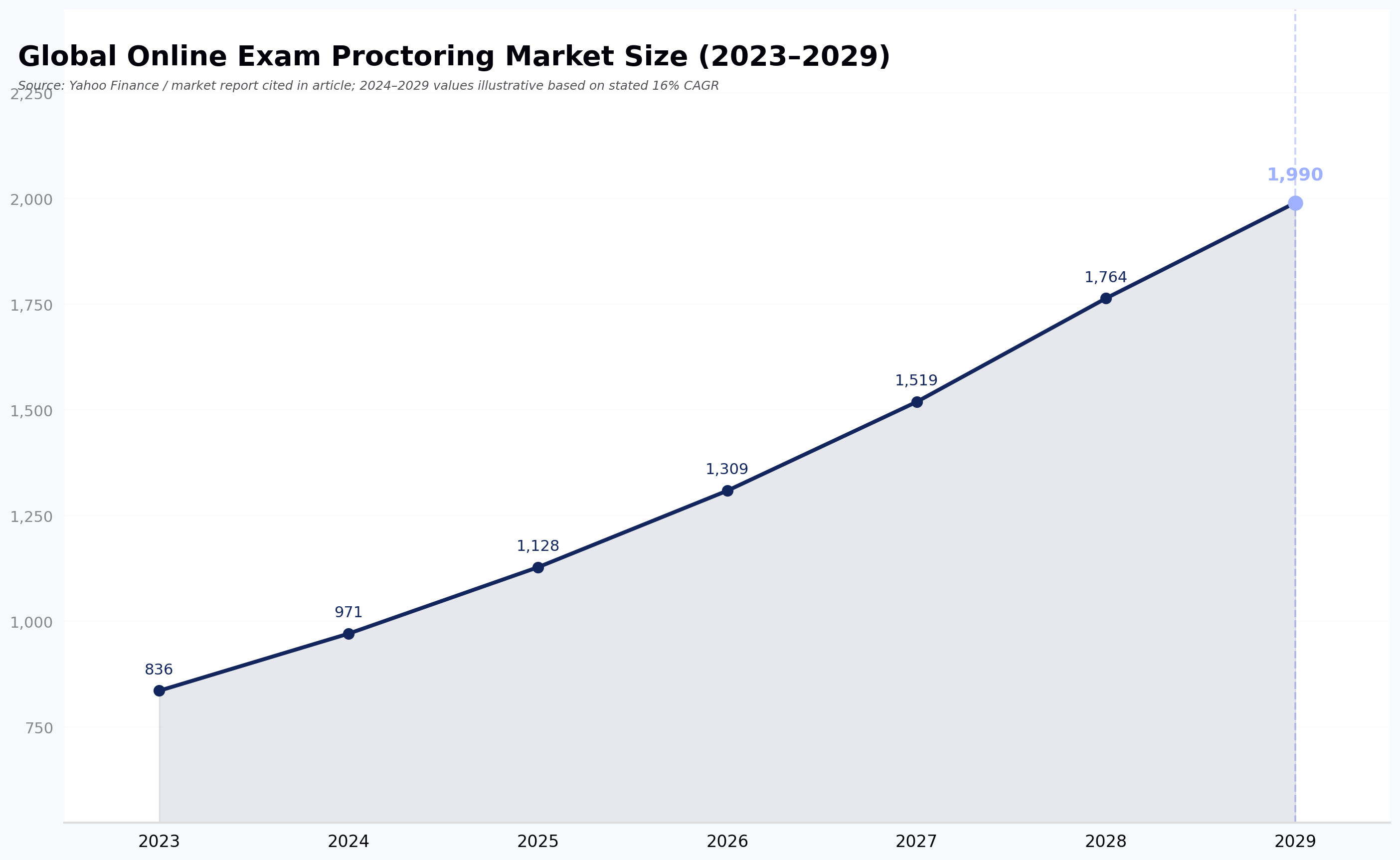
Today, proctoring software for online exams is a core part of online hiring, certification, and education programs. According to a market report referenced by Yahoo Finance, the global online exam proctoring market was valued at approximately $836.43 million in 2023 and is projected to reach $1.99 billion by 2029, growing at a CAGR of roughly 16% from 2024 to 2029.
Some of its key drivers include the rising adoption of online skills testing and certification programs, the internationalization of hiring, the need for cost‑effective and scalable assessment security, and advances in AI and machine learning that improve detection.
How does it work
Because AI handles most of the work, machine learning models are trained to look for specific signals that could indicate a potential integrity issue. These signals are very specific.
Here are some examples:
- Two faces appearing on the screen simultaneously
- No face detected in front of the camera
- Voices detected in the background
- Small rectangles (~2–3 in × 5 in), indicating a phone or other device
- Face looking away or down, suggesting the test-taker may be consulting notes
- Large rectangles (~8 in × 11 in), suggesting a notebook or extra paper is present
These cues are continuously monitored, sometimes twice per second, and machine learning models analyze each video frame, often using support vector machines or similar algorithms. Each flag is assigned a probability, and the system calculates an overall "cheating score" to flag suspicious behavior for further review.
The underlying idea is straightforward: break a complex integrity problem into narrow, well-defined detection tasks, score each one, and combine those signals into a risk profile that reviewers can act on.
Live proctoring vs AI proctoring
So how do you decide which type of remote proctoring is right for your assessment?
Live proctoring uses human supervisors who watch candidates through webcams in real time. A single proctor can watch several exam sessions simultaneously. If suspicious behavior happens, the proctor can intervene immediately. This method is often used for high-stakes exams (e.g., medical or professional certification tests).
However, large-scale hiring assessments require a different approach.
In AI-based remote proctoring, artificial intelligence analyzes exam sessions automatically. The system detects unusual patterns such as repeated head movement, multiple faces in the frame, or attempts to access restricted materials. This is generally suitable for medium-stakes assessments (e.g., pre-employment skill screenings) run at volume.
Functionality varies widely across AI platforms. Talent teams should evaluate features, detection quality, and ATS integration before selecting a solution.
Security & anti‑cheating mechanisms
Exam security stands at the heart of proctoring software for online exams. These platforms are designed to detect several forms of misconduct — for example:
- Face recognition, to make sure the candidate stays present throughout the exam
- Object detection, to spot phones or books that should not be in view
- Eye tracking, to notice when someone keeps looking away from the screen for too long
- Audio monitoring, to pick up whispered conversations or other unusual sounds
They can also scan the room so hidden help doesn't sit just out of camera range.
At the same time, organizations keep detailed logs of exam sessions. If there is ever a concern, reviewers can go back and study every second of video, audio, and activity data.
📌Also read: 10 Best AI Interview Assistants for Smarter Hiring in 2026
Types of Remote Proctoring Software
There are several types of software that hiring and assessment teams use to keep online exams fair and secure. Each type has its own way of watching over a test and reducing cheating.
| Type of Proctoring | How It Works | Key Benefits | Best For |
|---|---|---|---|
| Live Online Proctoring | A real person watches candidates in real time using video and audio. The proctor can intervene immediately if something seems off. | Feels most like a traditional exam hall. Immediate action possible. | High-stakes exams like medical certifications or professional licensing |
| Recorded Proctoring | The system records video, audio, and screen activity. Nobody watches live. Review happens after the exam, either by a person or AI. | Flexible scheduling. Reviewers can focus only on flagged moments. | Medium-stakes exams or remote assessments where live monitoring isn't practical |
| Automated Proctoring | AI monitors the session in real time, flagging unusual behavior such as movement, extra faces, or noises. Reviewers check flagged events later. | Highly scalable. Can monitor thousands of sessions at once. | Medium-stakes exams or large-scale assessments |
Some platforms also mix these approaches. They might use AI monitoring along with human review only when needed, often referred to as hybrid proctoring. This gives you the speed of automation and the judgment of a person when a flagged moment needs context.
AI in Remote Proctoring: Today and Tomorrow
Remote proctoring has changed a lot in just a few years.
What started as simple webcam monitoring has grown into AI‑powered systems that combine facial recognition, eye‑tracking, and behavior analysis to detect potential cheating. Vendors commonly report detection accuracy above 90%, though these figures are self-reported and should be treated as directional rather than independently verified. In practice, AI proctoring can catch suspicious activity that human proctors would easily miss and help maintain fairness at scale.
Today's AI proctoring combines biometric checks, screen monitoring, and real‑time behavior analytics to flag irregularities like unusual gaze patterns or secondary device use. Together, these give employers and educators additional signal that the person taking the test is who they say they are.
Looking ahead, AI in proctoring will continue to get smarter. Systems will use deeper behavioral analytics, richer biometric signals, and adaptive learning to distinguish between legitimate and suspicious behavior. They will also integrate more closely with hiring and certification workflows so assessments stay secure without slowing candidates down.
What to Look For in Proctoring Software for Online Assessments
Note: The following describes HackerEarth's approach to proctoring for technical hiring and assessment use cases. Treat as a vendor-provided capability summary, not an independent recommendation.
If you're evaluating proctoring tools for candidate assessments, it helps to have a concrete example of the capabilities on the market. HackerEarth's proctoring capabilities — used by 500+ global enterprises — offer a layered approach that combines browser lockdown, AI-assisted monitoring, and identity verification, designed for hiring and technical assessment workflows.
Capabilities include:
- Smart Browser lockdown: The Smart Browser restricts tab switching and unauthorized app use during the test.
- AI-assisted video proctoring: The system captures periodic snapshots and applies computer-vision models trained to detect signals such as multiple faces, gaze direction away from the screen, or objects in frame. Like all such models, it produces probability scores, not certainties, and is intended to flag events for human review rather than issue final verdicts.
- Audio proctoring: Detects background voices, keyboard-sharing sounds, or other audio cues that warrant review.
- Follow-up validation questions: Candidates may receive a follow-up question to explain their logic, which helps confirm understanding.
- Plagiarism detection: Submissions are compared against other candidates' work and online repositories to check originality.
- Question pooling and shuffling: Delivers different question paths to each test-taker, reducing the value of shared answers.
- ID verification: Through DigiLocker or other e-KYC providers, the platform checks that the person on screen matches the registered candidate.
- Additional controls: Disabling copy-paste, restricting IP addresses, and enforcing time limits.
Proctoring capabilities are designed to work with the rest of the hiring workflow, from online coding assessments to technical interview platforms.
Note: Specific proctoring features described here should be confirmed with the vendor for your use case; capabilities and configurations may vary by plan.
📌Interesting read: Top 7 Online Coding Interview Platforms in 2026
Benefits of Remote Proctoring for Online Assessments
When remote proctoring was first adopted widely during the pandemic, many thought it was just a temporary fix.
Now, it has become a core tool for secure online assessments. Industry reports, including a market analysis from Global Growth Insights, suggest that institutions using online proctoring may see meaningful reductions in cheating incidents compared with unproctored exams, though the specific magnitude varies by study, methodology, and assessment context.
This is why remote proctoring for online assessments continues to grow in both hiring and professional testing environments.
Flexible scheduling and greater access
Remote proctoring frees candidates from the constraints of physical test centers. Instead of having to travel or book a specific exam slot, they can take tests at a time that fits their schedule and from a location of their choice.
This flexibility makes assessments more inclusive, especially for candidates in remote areas or those balancing work, family, and study. It also opens up opportunities for people who would otherwise struggle with strict in‑person schedules — particularly relevant for global hiring pipelines.
Cost and resource savings
Traditional, in‑person exams come with real price tags that most teams never see at first glance. For example, test centre rental alone can run roughly £500–£3,000 per day (about $600–$3,600 USD) before staffing, equipment, and other overheads are included.
When you add invigilators, admin support, security personnel, marking, printing, and logistics, annual costs can easily climb into the six figures for organisations running frequent exams.
Remote proctoring can significantly reduce these costs. By removing the need for physical spaces, travel reimbursements, printed materials, and large onsite teams, organizations report substantial operational savings when moving to online proctoring platforms — with vendor-reported ranges often cited in the 40–60% range, though actual savings depend on program scale and current cost baseline.
Candidates save too, as they do not incur travel or accommodation expenses. These savings make frequent testing, continuous learning programs, and global certification initiatives more affordable and sustainable.
Scalability and consistency
Compared to traditional exams that require more rooms and more invigilators as numbers grow, proctoring software for online exams can monitor hundreds or thousands of candidates simultaneously.
This consistency means every test session follows the same monitoring standards, giving hiring teams and certification bodies confidence that large‑scale assessments remain fair and well‑managed.
Challenges & Ethical Concerns
Remote proctoring brings real benefits, but it also comes with challenges that matter for candidates and organizations alike.
Below are the key issues and ethical concerns to consider.
Privacy concerns
Video, audio, and screen activity captured in a candidate's private space, combined with AI monitoring, can feel intrusive. Some candidates report discomfort with continuous monitoring — a concern echoed across surveys of test-takers, though specific figures vary by study and population.
Organizations also have to navigate strict data protection rules like GDPR or other privacy laws to make sure personal information isn't misused or stored longer than needed.
Fairness and bias
It's also important to be realistic about bias in exams. Traditional in‑person testing can itself introduce unfairness when resources differ by location or demographic group.
While remote proctoring offers a way to standardize the testing environment, it is not completely immune to bias. Studies have shown that some AI systems can unfairly flag certain candidates, particularly when the algorithms are trained on non‑representative data.
Vendors publish varying accuracy claims. For example, Turnitin reports a false-positive rate of less than 1% for its AI writing detection tool. However, an independent test by The Washington Post, using a small sample of student essays, reported false positives as high as 50%. It's worth noting these figures measure different things — Turnitin's number is a system-wide rate for AI writing detection, while the Washington Post's number reflects a small-sample test of specific content — and neither should be generalized to all proctoring accuracy. False positives can nonetheless have real consequences for candidates, from academic misconduct accusations to lost job opportunities.
Researchers and vendors are working to address bias by training algorithms on more diverse datasets and combining AI review with human oversight.
Detecting AI-generated work
Remote proctoring and AI monitoring now face the added challenge of distinguishing human-written work from AI-generated text. For example, a 2024 study from Brock University, based on a limited sample of participants, found that humans could identify AI-generated responses only about 24% of the time. As with any single study, findings should be interpreted alongside its sample size and scope.
Since AI detection tools are also often unreliable, this raises a practical question for hiring teams:
Should you focus on better detection, or redesign assessments — using live coding, follow-up questions, and scenario-based tasks — to be more resistant to AI-generated answers?
Racial disparities in AI detection
Technology often reflects existing social biases. These same biases can appear in test proctoring software, which can unfairly impact candidates from marginalized groups.
According to a 2024 Education Week report, while 10% of teens overall said their work was falsely flagged as AI-generated, 20% of Black teens were misidentified, compared with 7% of white and 10% of Latino teens.
This highlights a serious equity concern and strengthens the case for careful oversight, inclusive algorithm design, and human review alongside automated checks.
What Candidates Should Expect During a Remote Proctored Assessment
Because hiring teams often field questions from candidates who are new to remote proctoring, it helps to know what the experience looks like on their end.
- System requirements: Most remote proctoring platforms require a laptop or desktop with a working webcam and microphone, a stable broadband connection, and an up-to-date browser. Chromebooks, tablets, and phones are often not supported.
- Room setup: Candidates are typically asked to sit in a quiet, well-lit, private room, with no other people present. Notes, extra monitors, and mobile phones must usually be out of reach.
- ID verification: Before the exam, candidates present a government-issued ID to the camera and may complete a face match.
- During the exam: The webcam, microphone, and screen are monitored. Candidates should avoid looking away for extended periods, speaking out loud, or leaving the frame.
- If flagged: A flag isn't an automatic failure. Most platforms escalate flagged sessions to a human reviewer, who examines the recording in context before any decision affects the candidate's result.
- Cost: For candidate-paid certification exams, remote proctoring fees typically fall in the $20–$35 range per exam, according to LanguageTesting.com. For employer-run hiring assessments, the cost is generally absorbed by the hiring organization.
Sharing a clear candidate-facing guide before an assessment reduces support tickets, false flags, and drop-off — all of which affect the quality of your hiring funnel.
The Future of Remote Proctoring for Online Assessments in 2026 and Beyond
The future of remote proctoring for online assessments is shaped by rapid technological advances and expanding use cases. Hybrid proctoring models are becoming more common in 2026, combining automated AI monitoring with human oversight so machines can flag potential issues and trained reviewers can assess them with context.
Integration with core hiring and learning platforms is another strong trend. Remote proctoring tools now work more closely with major applicant tracking systems (ATS) and learning management systems (LMS), which means fewer technical hurdles for candidates and simpler workflows for talent teams.
At the same time, vendors are investing in privacy and candidate experience, using techniques that collect only what is necessary and reduce friction for test‑takers. These developments point to a future where remote proctoring is more secure and more respectful of the people it serves.
Remote Proctoring Will Shape the Next Era of Digital Assessments
Given all the challenges we've explored, can remote proctoring for online assessments really lead the way? For hiring teams running online assessments at scale, the answer is yes — provided the tools are chosen and deployed with care.
Physical exam halls no longer define assessment environments. Technology now enables secure testing from almost anywhere in the world. Modern platforms combine webcam monitoring, identity verification, and intelligent analytics to detect suspicious activity during exams. AI adds another layer of capability, alongside — not in place of — human judgment.
Tools such as HackerEarth's proctoring capabilities illustrate the layered approach: browser lockdown, AI-assisted video and audio monitoring, ID verification, question shuffling, plagiarism detection, and time and copy-paste restrictions, integrated with the assessment workflow itself.
The careful balance between technology and oversight is what will define the future of digital assessments. While implementing these tools, hiring teams and educational institutions must stay mindful of fairness, accessibility, and transparency.
Book a demo today and see how remote proctoring fits into your assessment workflow.
FAQs
What should hiring teams look for in remote proctoring for online assessments?
Look for layered monitoring (browser lockdown, AI-assisted video and audio review, and human oversight for flagged sessions), strong identity verification, integration with your ATS or assessment platform, transparent data-handling practices aligned with GDPR/CCPA, and clear candidate communication tools. Avoid vendors who claim absolute accuracy — treat proctoring as a signal for review, not a verdict.
How accurate is AI‑based remote proctoring?
Vendors commonly report detection accuracy above 90%, but these numbers are self-reported and vary by definition and methodology. Independent, peer-reviewed benchmarks are still limited. In practice, AI is most reliable when paired with human review of flagged sessions rather than treated as a final decision-maker.
Can remote proctoring invade privacy?
Remote proctoring can feel intrusive because it may record video, audio, and screen activity in a private space. Surveys of test-takers regularly find that a meaningful share report discomfort with continuous monitoring. Privacy regulations such as GDPR and CCPA require clear consent, minimal data collection, and defined retention practices to protect candidates.
What industries use proctoring software for online exams?
Proctoring software for online exams is widely used in corporate hiring for skills and technical screening, in professional licensing and certification, and in higher education for online exams — anywhere the identity of the test-taker and the integrity of the assessment matter.
What happens if a candidate is flagged during a proctored assessment?
A flag is not an automatic failure. Most platforms send flagged sessions to a human reviewer, who examines the recording in context — for example, checking whether a noise was a household interruption or evidence of a second person. Only after that review is any action typically taken on the candidate's result.
Is remote proctoring software replacing human proctors?
Remote proctoring software is not fully replacing human proctors. It is automating many monitoring tasks and working alongside humans for review and decision‑making. AI tools flag potential issues for people to assess, which is typically more reliable than either alone.
Editorial note: Publication date and read time (calculated at 250 wpm) should be finalized before publishing. If publication occurs in 2025, the title's "2026 Guide" framing should be reviewed by the editorial team; the year reference is retained here per the original draft's framing.